Your office has more people than desks on a Tuesday and half-empty rows on a Friday, and right now a spreadsheet is supposed to sort that out. It does not. Desk booking software is the category built to fix it, but the market is a wall of near-identical feature lists, so it is hard to tell what actually matters. This guide explains how desk booking software works, which features earn their keep, and how to choose and roll out a system that people will still be using in six months.

Your office has more people than desks on a Tuesday and half-empty rows on a Friday, and right now a spreadsheet is supposed to sort that out. It does not. Someone books a desk, someone else takes it, a third person messages the office manager to ask where they can sit, and by mid-morning the whole thing is being run over chat.
Desk booking software is the category built to fix exactly this. The problem is that once you start looking, every vendor's page reads the same: the same feature bullets, the same screenshots, the same promises. It is genuinely hard to tell what matters and what is padding.
This guide is the down-funnel version of the story. It assumes you already know you need a system and are trying to pick one. We will cover how desk booking software works under the hood, the five features that actually earn their keep, how to judge a tool in a demo, and how to roll it out so people are still using it two months later. If you want the concept-level background first, the complete guide to desk sharing covers what desk sharing is and how to work out your ratio.
What desk booking software actually does
Strip away the marketing and desk booking software does three plain things.
First, it lets a person reserve a workspace before they arrive. They pick a day, pick a desk, and confirm, so they know their spot is waiting instead of finding out at 9 a.m. that there is nowhere to sit.
Second, it shows who is sitting where. A live floor plan turns the abstract question "will there be room on Wednesday?" into a map you can look at. Occupied desks are marked, free desks are marked, and you book the one you want.
Third, it frees the desk again. When a booking ends, or when someone never checks in, the desk goes back into the pool automatically. That last part is what a spreadsheet can never do on its own, and it is why utilization actually improves rather than just being tracked.
Everything else a vendor lists is a layer on top of those three jobs. Analytics sit on top of "who sat where." Rules sit on top of "reserve in advance." Integrations sit on top of "make booking easy." Keep those three jobs in mind and the feature lists get much easier to read.
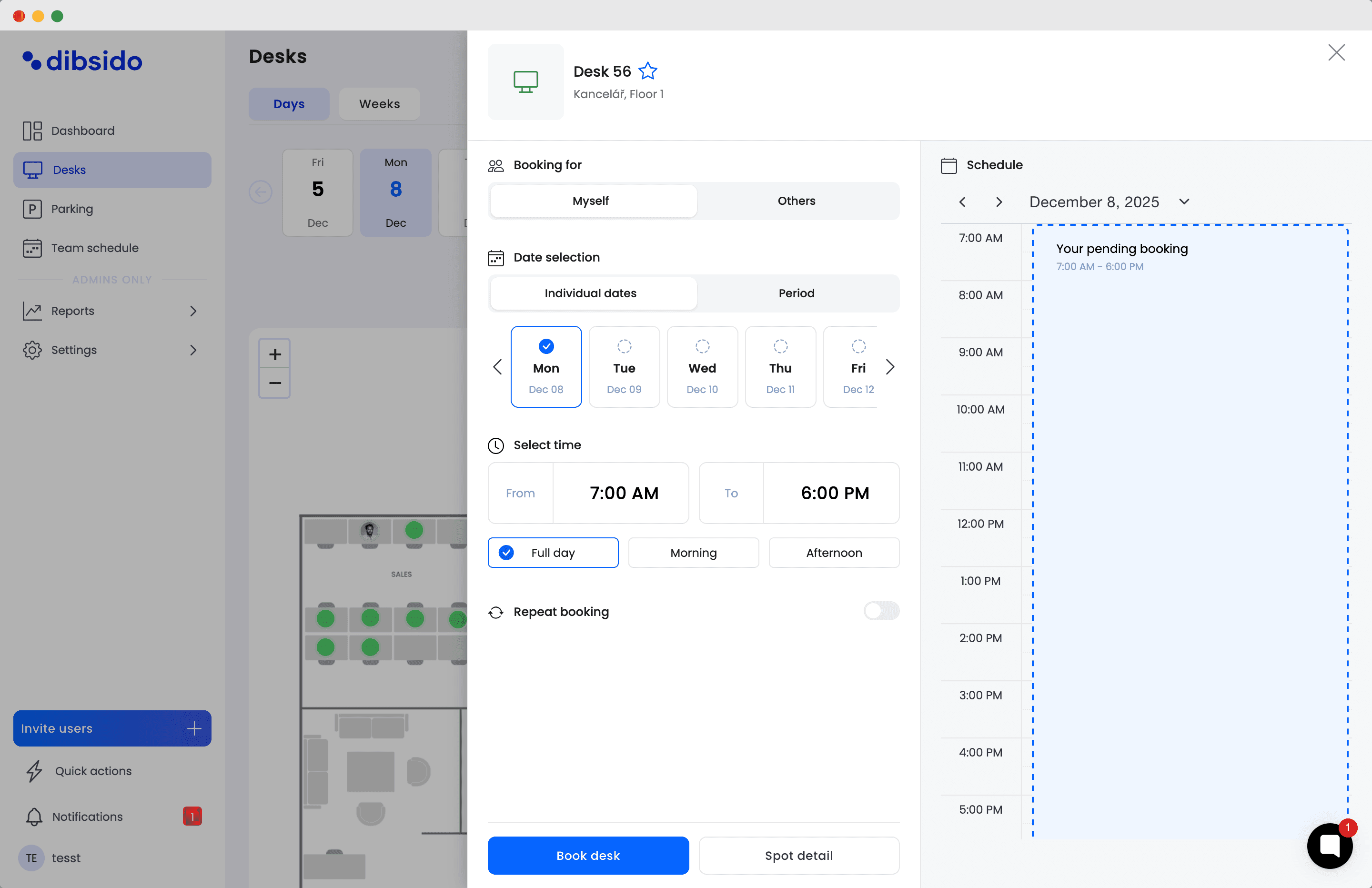
How it works, step by step
The setup is quick and the daily loop is quicker.
An admin uploads a floor plan, usually just an image of the office layout, and marks which desks are bookable. Some desks might be fixed for specific people, some might belong to a team neighborhood, and the rest go into the shared pool. This is a one-time job that takes minutes to a couple of hours depending on the size of the office.
From then on, the employee side is a short loop. Someone opens the app, or a chat or calendar integration, sees the floor plan for the day they want, taps a free desk, and confirms. On the day they come in, they check in, often from their phone or a kiosk, which tells the system the desk is genuinely in use. If they booked but never check in, the reservation is released so the desk is not sitting empty while marked as taken.
That check-in step is small but it is the mechanism that solves one of the most common and most irritating problems in a shared office, which we will come back to in a moment.
The five features that actually matter
Most desk booking tools list twenty or thirty features. In practice, five of them carry the value, and a tool that does these five well beats a tool that does fifteen things adequately.
A booking flow that takes under a minute. This is the one people underrate and it is the one that decides everything. If reserving a desk takes six taps and a page load between each, people stop bothering and go back to guessing. Time it yourself in a demo. If you cannot book a desk in under a minute on your first try, neither can your least patient colleague.
A real-time interactive floor plan. A list of desk numbers is useless; a map is intuitive. People want to see that they are sitting near their team, away from the printer, by a window. The floor plan needs to be genuinely live, reflecting bookings as they happen, not a static picture with a separate availability list.
Booking rules you set once. Every office has constraints: how far ahead people can book, which teams sit where, how many days a week a desk can be held, what your desk-sharing ratio is. Good software lets you configure these once and then enforces them quietly. If changing a rule needs a support ticket, that is a red flag.
Check-in to catch no-shows. This is the feature that fixes the "I booked it and someone took it anyway" problem. It is a real, recurring source of friction: people vent about a colleague settling into their reserved desk, taking it to HR, and getting nowhere. A check-in window plus automatic release means a booked desk that nobody claims goes back to the pool instead of sitting phantom-occupied. If no-shows are your main pain, read the dedicated playbook on desk booking no-shows and ghost bookings.
Utilization reporting. You cannot right-size an office you cannot measure. The data answers the questions that justify the whole exercise: how many desks do we actually need, which days are overbooked, which floor is dead. This is where desk booking software pays for itself, because it turns real estate decisions from a guess into a number.
If a tool nails these five, the rest is genuinely secondary. If it is weak on any of the five, no quantity of secondary features makes up for it.
What the software does not do
It is worth being honest about the boundary, because overselling this is how offices end up disappointed.
Desk booking software tracks, surfaces, and flags. It does not enforce policy on its own and it does not manage people. It will show you that the same person has no-showed four times this month; it will not have a conversation with them. It will release an unclaimed desk; it will not decide whether repeat offenders lose booking privileges. Those are human calls, and they should stay human.
This matters when you are reading vendor claims. "Eliminates no-shows" really means "detects and releases them." "Enforces your seating policy" really means "applies the rules you configured." The tool is the instrument; the policy and the judgment are yours. Set the rules deliberately, keep a person in the loop, and the software does the tedious part reliably.
How to choose: judge the demo, not the feature list
When you have a shortlist of two or three tools, do not compare spec sheets. Do this instead.
Book a desk in each one as if you were a regular employee, and time it. The tool that makes booking feel effortless is the tool people will actually use, and adoption is the whole game. A gorgeous analytics dashboard is worthless if nobody books.
Then check four things. Is the floor plan genuinely live, or a static image with a separate list? Can you change a booking rule yourself, without a support ticket? Does it plug into the calendar or chat tool your team already lives in, so booking happens where people already are rather than in yet another app? And does it report utilization in a way you would actually act on?
Price matters, but read it carefully. Most tools charge per user per month, and many have a free tier for small offices or a free trial, so you can test with real people before paying. Watch for two traps: per-module pricing that climbs once you add meeting rooms or parking, and minimum seat counts that make a tool expensive for a small team. Match the plan to the number of people who will book, not your total headcount. When you are ready to compare named products, our roundup of the best desk booking software lays out specific tools side by side, each with its trade-offs.
One more thing to weigh: whether you want desks alone or desks, meeting rooms, and parking on one platform. Running three separate tools for three shared resources multiplies the admin and the logins. A single system that handles all of them is usually simpler to run and cheaper than the sum of the parts.
Rolling it out without the pushback
The software is the easy part. The rollout is what decides whether it sticks, and most failures are rollout failures, not product failures.
Start with one team, not the whole office. A two-week pilot with a friendly team surfaces the real friction points, the rules you got wrong, and the questions people ask, while the stakes are low. Fix those before you scale.
Keep the desk-sharing ratio conservative at first. If you have historically had roughly one desk per person and you jump straight to two people per desk, the first crowded Tuesday will sink the project. Ease into it and let the utilization data, not a target on a slide, tell you how far you can push.
Communicate the rules plainly. People do not resist desk booking because they love their fixed desk; they resist because they are worried they will show up and have nowhere to sit. Tell them exactly how far ahead they can book, what check-in does, and what happens if a desk is not claimed. Certainty kills the anxiety. There is a whole guide to getting employees on board with desk booking and another on rolling it out without pushback if this is where you expect the most resistance.
Then re-check after about 60 days. Look at the utilization data, adjust the ratio and the rules, and only then expand to the rest of the office. Plan for roughly two to three months from pilot to a stable, office-wide setup. That is not slow; that is the difference between a system people use and a tool that quietly dies.
The short version
Desk booking software reserves a workspace in advance, shows who is sitting where, and frees the desk when the day ends. Five features matter most: a sub-minute booking flow, a live floor plan, rules you set once, check-in to catch no-shows, and utilization data. Judge tools by booking a desk yourself and timing it, not by counting features. And remember that the tool tracks and flags while people set the policy and make the calls.
If your office is stuck refereeing desks over chat and a spreadsheet, that is the problem this category exists to end. Dibsido handles desk booking, meeting rooms, and parking on one platform with a booking flow built to take seconds, an interactive floor plan, check-in, and utilization analytics. You can try it free, book a demo, or see pricing to work out what a plan would cost for your team.
Frequently asked questions
What is desk booking software?
Desk booking software is a tool that lets employees reserve a workspace in advance, shows a live map of which desks are taken, and releases the desk when the booking ends. It replaces spreadsheets and informal first-come arrangements in offices where more people share fewer desks than there are staff, which is most hybrid offices.
How does desk booking software work?
An admin uploads a floor plan and marks each bookable desk. Employees open an app or a chat integration, pick a day and a desk from the map, and confirm. On the day, they check in to hold the desk, and if they never show up the reservation is released so someone else can take it. Behind the scenes the system records which desks were used, giving managers utilization data.
What features actually matter in desk booking software?
Five features carry most of the value: a booking flow that takes under a minute, a real-time interactive floor plan, booking rules you configure once (advance limits, neighborhoods, desk-sharing ratios), check-in to catch no-shows, and utilization reporting. Most other line items are variations on these. Judge a tool on how fast and clear booking feels, not on the length of its feature list.
How much does desk booking software cost?
Pricing is usually per user per month, often in the range of a few dollars or euros per user, and many vendors offer a free tier for small offices or a free trial. Watch for per-module pricing when you also want meeting rooms or parking, and for minimum seat counts that make a tool expensive for a small team. Match the plan to the number of people who will actually book, not your total headcount.
What is the difference between desk booking, hot desking, and desk sharing?
Desk sharing is the general model where more people share fewer desks. Hot desking is a form of it where you grab any free desk with no reservation, first come first served. Desk booking (also called hoteling) is desk sharing with a reservation, so you know your desk is waiting before you leave home. Most hybrid offices pick the reservation model because it removes the nine-a.m. scramble.
Does desk booking software stop no-shows?
It catches them, it does not police them. A check-in step asks the person to confirm they arrived within a set window; if they do not, the desk is released back to the pool automatically. The software surfaces repeat no-shows in the data, but whether that leads to a quiet word or a policy change is a human decision. The tool tracks and flags; people set and enforce the rules.
How do I choose desk booking software for a hybrid office?
Shortlist two or three tools, then book a desk in each one as if you were an employee and time it. Check that the floor plan is genuinely live, that you can set booking rules without a support ticket, that it plugs into the calendar or chat tool your team already uses, and that it reports utilization. Run a two-week pilot with one team before rolling it out to the whole office.
How long does it take to roll out desk booking software?
The software setup, uploading a floor plan and marking desks, takes minutes to a few hours. The rollout that decides success takes longer: start with one team for two weeks, keep the desk-sharing ratio conservative, communicate the rules clearly, and re-check utilization after about 60 days before expanding. Plan for roughly two to three months from pilot to a stable office-wide setup.
Our platform is designed to empower businesses of all sizes to work smarter and achieve their goals with confidence.