The room calendar is solid green and people still complain they can never book a room. Both things are true at once, and the number that explains why is meeting room utilization. Here is how to measure it, what a healthy rate looks like, and how to fix the gap between what is booked and what is actually used.

Meeting room utilization = room-hours actually used divided by room-hours available. A fully booked calendar is not the same as a fully used office.
The number most teams accidentally track is booked time, not used time. No-shows, zombie recurring invites, and a 2-person call sitting in a 12-seat boardroom all inflate the booking rate while rooms stay empty.
There is no single correct target, but very low utilization usually means too many or wrong-sized rooms, and very high utilization means people genuinely cannot get a room when they need one.
You can measure real usage from booking plus check-in data. You do not need occupancy sensors to start.
Once you have the number, the fixes are operational: require check-in, release no-shows, retire zombie recurring bookings, and right-size the room mix.
Pull up the room calendar on a Tuesday and it is solid green. Every room, every slot, booked. Then walk the floor at 2pm and three of the six rooms are dark, one has a single person on a laptop in a space built for twelve, and two people are hovering in the corridor because they swear there is nowhere to meet.
Both of those pictures are real at the same time. The calendar is telling you the rooms are full. The floor is telling you they are empty. The number that reconciles the two is meeting room utilization, and most offices never actually measure it. They measure how much the rooms are booked, which is a completely different thing and the reason the complaints never stop no matter how many rooms you add.
This guide walks through what meeting room utilization really measures, how to calculate it, what a healthy rate looks like, why the calendar lies, and how to measure real usage without buying a single sensor.
What meeting room utilization actually measures
Meeting room utilization is the share of available room time that is actually used for meetings. The important word is "used." You are not measuring whether rooms are reserved, popular, or in demand. You are measuring occupied capacity against total capacity, the same logic that sits behind office space utilization for the building as a whole. A room is a small, expensive slice of your office, and every hour it stands empty while reserved is capacity you are paying for and not getting.
The metric only becomes useful when you are strict about the difference between three numbers:
Available room-hours: how many hours the room could realistically be used, usually working hours across the days people are in.
Booked room-hours: how many of those hours are reserved on the calendar.
Used room-hours: how many of those reserved hours a room was actually occupied.
Most dashboards stop at booked. That is the trap. Booked time tells you about calendar behaviour. Used time tells you about the office. The distance between them is where the money and the frustration both live.
The gap between booked and used (why your calendar lies)
A meeting room calendar records intentions, not attendance. Someone sets up a weekly sync in a big room six months ago, half the team now works from home on that day, and the invite still blocks the room every week. Someone grabs a room "just in case" for a call that ends up happening at a desk. A 30-minute catch-up gets a 60-minute booking because that is the default. None of these people are doing anything wrong, and all of them leave a reserved room empty.
Stack a handful of those per room per day and the arithmetic turns ugly fast. If each of six rooms carries two phantom bookings a day of an hour each, that is twelve room-hours a day, or sixty a week, that read as fully booked and deliver nothing. That is often the entire reason an office feels short on rooms. You are not out of rooms. You are out of rooms that are available, because the empty ones are locked behind bookings nobody is using.
This is the same pattern that shows up with desks, which is why the fix for desk booking no-shows and the fix for empty-but-booked meeting rooms are close cousins. In both cases the leak is the gap between the reservation and the reality.
How to calculate meeting room utilization
The formula is deliberately simple:
Meeting room utilization = used room-hours ÷ available room-hours × 100
Take one room that is open 9 hours a day, 5 days a week. That is 45 available room-hours in a week. If the room is genuinely used for 18 of those hours, utilization is 18 ÷ 45 = 40 percent. For the whole office, add up used room-hours across every room and divide by the total available room-hours across all of them.

The honest part is choosing the inputs. If you plug booked hours into the "used" slot, you will get a flattering number that matches the green calendar and tells you nothing. The measurement only earns its keep when the top of the fraction is real usage, which means you need a way to tell a used room from a merely reserved one. That is the next section.
A quick note on "available." Counting a room as available 24 hours a day will deflate every number into the single digits and make healthy rooms look abandoned. Use the hours people are actually in the building. For most hybrid offices that is the working day on the days with real attendance, not a theoretical 168-hour week.
What counts as a good meeting room utilization rate
There is no universal correct number, and anyone quoting one precise figure as the industry standard is guessing. What matters is the direction the number points.
As a rough working range, many teams treat 40 to 60 percent as healthy for shared rooms. Here is the reasoning rather than a borrowed statistic:
Under about 40 percent: you probably have too many rooms, or the wrong mix. The classic version is a floor full of large rooms when 80 percent of meetings are one-to-ones and small team calls. The rooms are not failing, the sizing is.
Roughly 40 to 60 percent: a comfortable zone where people can usually get a room without rooms sitting idle most of the day.
Above about 70 to 80 percent: this looks efficient, but it usually means people routinely cannot find a free room when they need one. High utilization and "there is never a room" are the same story told from two sides.
The point of the benchmark is not to hit a magic percentage. It is to notice when you are far outside the range and to ask the follow-up question: is this a room-count problem, a room-size problem, or a booking-behaviour problem? Often it is the last one, which is the cheapest to fix.
Why rooms sit empty when the calendar says they are full
When you break a low-usage, high-booking office down, the empty-but-booked time almost always comes from the same handful of sources:
No-shows. The booking is real, the meeting is not. Nobody cancels, so the room stays locked.
Zombie recurring meetings. A standing invite outlives the reason it was created. These are brutal because they quietly reserve prime slots every single week.
Oversized bookings. Two people take a 12-seat boardroom because it was the only thing free, which then shows the boardroom as "used" at eight percent of its real capacity.
Padding. Default 30 or 60 minute bookings for conversations that take ten.
Noticing which of these dominates is the whole game, because the response is different for each. No-shows need a check-in and a release rule. Zombie recurring meetings need a periodic cleanup of standing invites. Oversized bookings need a better room mix and smaller rooms. You cannot tell which lever to pull until you can see the gap, which brings us back to measurement.
How to measure room usage without sensors
You will see a lot of advice that says the only real way to measure meeting room utilization is occupancy sensors in the ceiling. Sensors are accurate, but they are also a hardware project, a budget line, and a procurement cycle, and you do not need them to start. For most small and mid-sized hybrid offices, your meeting room booking system already holds most of the data.
Here is the practical, no-hardware version:
Booking data gives you reserved room-hours per room, per day, per size.
A check-in step, by tablet at the door, a QR code, or the app, confirms a reserved room was actually claimed. A booking that is never checked into is a no-show.
Used room-hours are then your checked-in bookings, and no-show rate is the reservations that were never confirmed.
That gives you a genuine usage number, derived from reservations and check-ins rather than sensor feeds. It is not perfect, people occasionally forget to check in, but it is close enough to run decisions on, and it costs nothing beyond turning the feature on. Dibsido builds utilization from exactly this reservation and check-in data, with no occupancy sensors involved, which is the honest limit worth stating up front: it measures what people booked and claimed, not a motion reading of the room.
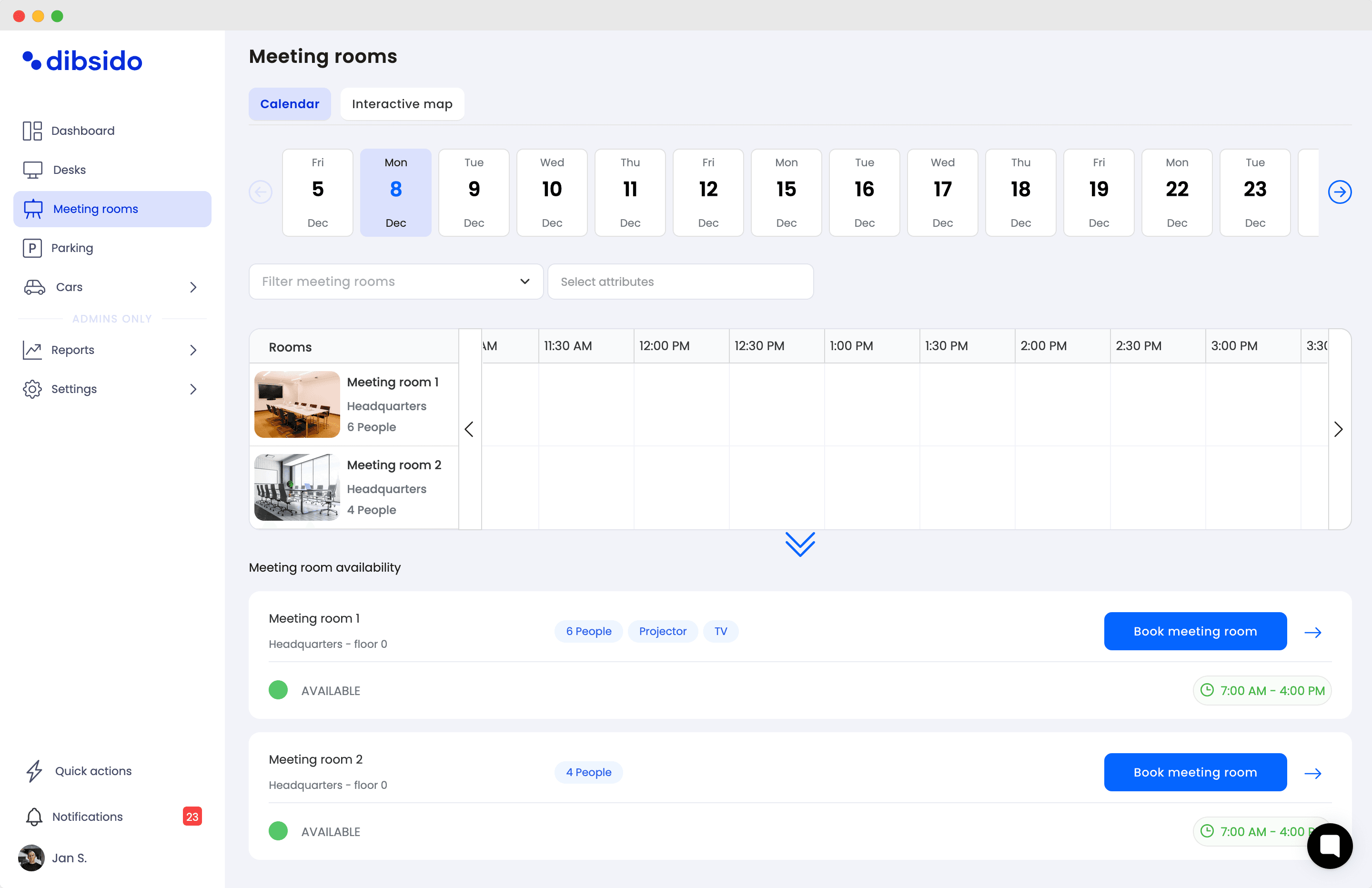
If you want the fuller operational playbook for the symptoms rather than the metric, the meeting room management guide covers room hogging and no-shows in more depth.
What to do once you have the number
A utilization number on its own changes nothing. The value is in the action it unlocks, and the actions are mostly operational rather than technical:
Turn on check-in and auto-release. If a room is not claimed within a short window, free it so someone else can grab it. This alone recovers most no-show time.
Audit recurring bookings. Once a quarter, ask owners of standing invites to re-justify them. The zombies die quietly.
Right-size the mix. If small meetings dominate, convert a big room into two small ones or add a couple of two-person focus rooms. Utilization rises because the rooms finally match the demand.
Set a fair-use policy for repeat no-shows. In Dibsido you can block someone from booking for a set period when they repeatedly reserve and never show, across desks, parking, and meeting rooms. The software flags the pattern and enforces the rule you set. The policy, and how strict it is, stays a human decision.
Re-measure. Utilization is a loop, not a one-off. Check it again after the changes and see whether the gap between booked and used actually closed.
The through-line is simple. The software gives you the number and automates the enforcement, but the judgement about how many rooms you need, how big they should be, and how firm your no-show rule is, that part is yours.
Meeting room utilization FAQ
What is meeting room utilization?
Meeting room utilization is the share of available room time that is actually used for meetings. You measure used room-hours against the room-hours a room could have been used during working hours. It tells you whether your rooms are genuinely busy or just heavily booked, which is a different question.
How do you calculate meeting room utilization?
Divide the room-hours actually used by the room-hours available, then multiply by 100. For one room open 9 hours a day across 5 days, that is 45 available room-hours a week. If it is used for 18 of them, utilization is 18 divided by 45, which is 40 percent. For a whole office, add up used room-hours across every room and divide by the total available room-hours.
What is a good meeting room utilization rate?
There is no single correct number, but a rough working range for shared rooms is 40 to 60 percent. Below about 40 percent usually means too many rooms or the wrong mix of sizes. Above about 70 to 80 percent means people regularly cannot find a free room, which is a capacity problem even though it looks efficient on paper.
Why do meeting rooms look fully booked but sit empty?
The calendar records intentions, not attendance. No-shows, recurring invites nobody cancels, and double-length placeholder bookings all hold a room on the calendar without anyone using it. A small number of these per room per day is enough to make a lightly used office look fully booked.
What is the difference between booked and used meeting room time?
Booked time is every hour a room is reserved on the calendar. Used time is the hours a reserved room was actually occupied. The gap between the two is the single most useful thing to measure, because it is where wasted room capacity hides and where the cheapest fixes live.
How do you measure meeting room utilization without sensors?
Use your booking data plus a check-in step. Booking data gives you reserved room-hours. A check-in, by tablet, QR code, or app, confirms a room was actually claimed. Reservations that are never checked into are your no-show rate, and used minus no-show gives you a practical measure of real usage without any hardware.
How can you reduce meeting room no-shows?
Require a quick check-in so unclaimed rooms surface as no-shows, send a reminder before the meeting, auto-expire bookings nobody checks into so the room frees up, and set a fair-use policy for people who repeatedly book and never show. The software can flag and enforce the rule, but the policy itself is a decision for you.
Does Dibsido show meeting room utilization?
Yes. Dibsido records room bookings and check-ins and reports usage back to you, so you can see which rooms are busy, which sit empty, and where no-shows cluster. The numbers come from reservations and check-ins rather than occupancy sensors, and what you do with them, such as changing the room mix or setting a no-show policy, stays your decision.
If your rooms look full but your floor looks empty, start by measuring the gap, not by adding rooms. You can do it with the booking and check-in data you already have. Dibsido's meeting room booking software records both and reports the usage back, and you can try it free or book a demo if you want to see the reports first.
Our platform is designed to empower businesses of all sizes to work smarter and achieve their goals with confidence.