A clean desk policy used to be an information-security formality, something the compliance team owned and most people ignored. That is changing, and the reason has nothing to do with audits. Offices are quietly moving away from one desk per person. As more desks get shared, the state you leave a desk in stops being your own business and becomes the next person's starting point. This guide explains what a clean desk policy is, what to put in one, and how to introduce it so people actually follow it, with an example policy and a checklist you can adapt.

A clean desk policy is a simple rule set for clearing and securing your workspace, covering papers, screens, removable media, and personal items, so sensitive information is not left exposed and a shared desk is usable for the next person.
It matters more in hybrid and hot-desking offices because desks are increasingly shared rather than owned. A messy desk used to be private. A shared desk left messy is now someone else's problem.
A good policy covers two things at once: security (confidential documents, locked screens, secure storage) and shared-desk hygiene (clearing the surface and resetting the desk at the end of the day).
The fastest way to get a clean desk policy resented is to make it feel like surveillance. Keep it short, explain the why, and make resetting a desk easy rather than nagged.
Software can make the reset easier by tying it to desk booking and check-ins. Enforcement, though, is a people decision your managers make, not something a tool does on its own.
A clean desk policy used to be a compliance formality. The information-security team owned it, it lived in a handbook nobody opened, and most people ignored it without consequence. That is changing, and the reason has little to do with audits.
Offices are moving away from one desk per person. Hybrid schedules mean fewer people are in on any given day, so assigning everyone a permanent desk wastes space. The result is shared desks, hot desking, and rotating seating, where the desk you use on Tuesday belongs to someone else on Wednesday. In that setup, the state you leave a desk in stops being your own business. Yesterday's coffee cup, a stray notebook, or a screen left unlocked all become the next person's starting point.
This guide explains what a clean desk policy is, what to put in one, and how to introduce it so people actually follow it. It includes an example policy you can adapt and a checklist you can hand to your team.
What is a clean desk policy?
A clean desk policy is a short set of rules for how employees clear and secure their workspace, usually at the end of the day or whenever they leave the desk for an extended period. It covers putting away papers and documents, locking computer screens, storing removable media securely, and removing personal items from the surface. The idea is long established in information security: ISO 27001, the international standard, includes a clear desk and clear screen control, so the concept is not new even if the reason it matters has shifted.
It serves two purposes at once. The first is security: confidential documents, customer data, and login details should not be left in view where a visitor, a cleaner, or a colleague without need-to-know could read them. The second is practical hygiene for shared workspaces: a desk that several people use across the week needs to be clear and usable when the next person sits down. Older clean desk policies leaned almost entirely on the first purpose. Modern hybrid offices need both.
Why hybrid and hot-desking offices need one now
When a desk has a single owner, a messy desk is a private problem. Nobody else is affected if you leave papers out overnight. As soon as a desk is shared, that changes. A surface left cluttered, a monitor still logged in, or personal items left behind all land on whoever uses the desk next.
This is why clean desk policies are becoming less of a formality and more of an operational need. Desk sharing is rising across hybrid offices, and the more desks are shared, the more the end-of-day reset matters. A policy that once protected against a rare confidentiality breach now does something more everyday: it keeps shared desks working.
The benefits worth naming when you introduce one:
Information security. Confidential documents and unlocked screens are the most common way sensitive information leaks inside an office. Clearing and locking removes the easy exposure.
Data protection. Documents with personal or customer data left on an open desk work against data-protection obligations such as the GDPR. A clean desk reduces that risk.
Usable shared desks. A cleared, reset desk is ready for the next person, which is the difference between desk sharing that works and desk sharing people quietly avoid.
A more professional space. Clear desks read as an organized office to visitors, candidates, and clients walking through.
Less friction in the rotation. When everyone resets their desk, nobody inherits someone else's mess, and the social tension that sinks shared-desk setups never builds up.
If you are still designing how shared seating works, it is worth pairing the policy with the wider rollout. Our guides to hot desking best practices and desk sharing cover the seating side that a clean desk policy sits on top of.
What a clean desk policy should include
A useful policy is specific without being exhausting. These are the areas to cover.
Documents and paper. File or shred anything containing confidential or personal information rather than leaving it on the desk. Do not leave printouts in the printer tray.
Screens. Lock your computer whenever you step away, and set devices to lock automatically after a short idle period. This is the clear screen half of the policy.
Removable media. Store USB drives, external disks, and any portable storage in a locked drawer or locker, not loose on the desk.
Whiteboards and notes. Wipe whiteboards and remove sticky notes that contain sensitive content, including passwords, client names, or internal numbers.
The desk surface. Clear the surface at the end of the day. In a shared or hot-desking office, this is the rule that makes the rotation work, so it deserves emphasis.
Personal items. Take valuables and personal belongings with you, or store them in an assigned locker. Shared desks should not accumulate anyone's permanent clutter.
Scope and ownership. State who the policy applies to, when it applies (end of day, when leaving for meetings, or both), and who owns and reviews it.
You do not need a separate rule for every scenario. A handful of clear expectations that people can remember beats a long document that nobody reads.
An example clean desk policy
Here is a short example you can adapt to your office. Keep it this brief. If you want a version tailored to your company name and setup, you can generate a customised clean desk policy with our free tool.
Clean Desk Policy
Purpose. To protect confidential information and keep our shared workspaces usable for everyone.
Scope. This policy applies to all employees, contractors, and visitors using desks in our offices.
The policy. When you leave your desk for the day, or for an extended period:
1. Clear all papers from the surface. File or shred anything containing confidential or personal information.
2. Lock your screen whenever you step away, and shut down or lock your device at the end of the day.
3. Store USB drives, external storage, and devices in a locked drawer or locker.
4. Remove sensitive notes from whiteboards and your desk, and clear the printer tray.
5. Take your personal items with you or store them in your locker, and leave the desk clear for the next person.
Responsibilities. Every employee is responsible for following this policy at their own desk. Managers are responsible for supporting it and addressing repeated issues. The office manager reviews this policy once a year.
A clean desk policy checklist
For day-to-day use, a checklist is easier to follow than a policy document. Share this as the end-of-day reset for shared and hot desks.
Before you leave a shared desk:
[ ] Papers filed or shredded, nothing confidential left out
[ ] Printer tray empty
[ ] Screen locked, device shut down or locked
[ ] USB drives and external storage in a locked place
[ ] Whiteboard and sticky notes cleared of sensitive content
[ ] Personal items taken with you or in your locker
[ ] Desk surface clear and ready for the next person
A checklist like this works best when it is visible at the point of use, on a desk card, a wall near the shared desks, or built into the app people check out of their desk with.
How to introduce a clean desk policy without resentment
Clean desk policies have a reputation problem. They are among the office rules people most often push back on, usually because they can feel like monitoring rather than mutual respect. Employees describe losing the small comforts of a personal space, the daily effort of setting up a new desk, and the sense that the rule exists to keep an eye on them rather than to help. If your rollout ignores that, the policy gets quietly ignored.
A few principles keep it on the right side of that line.
Explain the why, not just the rule. People follow a rule they understand. Lead with the shared-desk reality and the security reason, not with the policy text.
Frame it as respect, not surveillance. The goal is that nobody inherits someone else's mess and nobody's confidential work is left exposed. That is a fairness argument, and it lands better than a compliance one.
Make the reset effortless. The single biggest driver of compliance is whether people have somewhere to put their things. Lockers or storage near shared desks turn a chore into a ten-second habit. A policy that asks people to clear a desk but gives them nowhere to put their belongings will fail.
Focus on the end of the day, not the work day. A clean desk policy is about how you leave a desk, not how tidy you keep it while working. Policing desks during the day is what creates resentment.
Keep it short. A one-screen policy and a checklist beat a multi-page document. Three clear rules people remember outperform fifteen they do not.
Where desk booking fits
A clean desk policy is a people policy first. Tools do not replace it, but they can make the reset part easier to sustain in a shared-desk office.
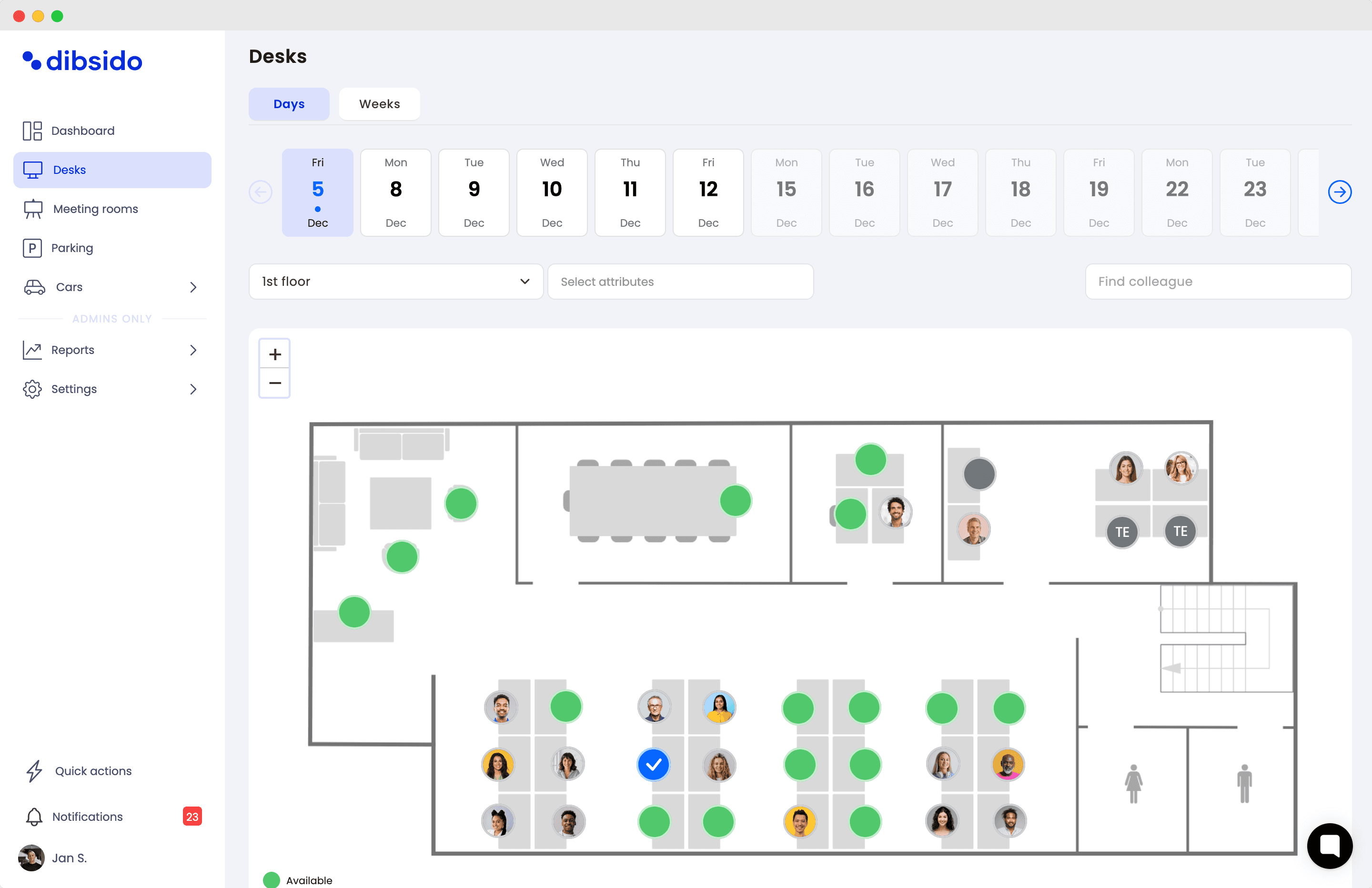
When desks are booked through an app, each desk has a clear owner for the day and a clear handover point. A check-in and check-out step gives people a natural prompt to reset the desk as they leave, and it makes bookings and usage visible to whoever runs the office. That visibility is useful when you want to know whether shared desks are actually being cleared, or to remind a team about the habit.
What software does not do is enforce the policy for you. A tool can prompt someone to check out and can surface who is using which desk, but the decision about how to handle someone who repeatedly leaves a desk a mess is a management one. Keep the policy and the tooling in their own lanes: the policy sets the expectation, the tool reduces the friction, and people apply the consequences.
Dibsido handles desk booking and hot desk booking with check-ins, so each shared desk has a clear daily owner and an easy point to reset it. It is free for up to 10 users, no credit card required. Try it free or book a short demo to see how it fits the way your office shares desks.
Clean desk policy FAQ
What is a clean desk policy?
A clean desk policy is a short set of rules for how employees clear and secure their workspace, usually at the end of the day or whenever they leave the desk. It covers putting away papers and documents, locking screens, storing removable media securely, and removing personal items. It has two goals: protecting sensitive information from being left in view, and keeping shared desks clear and usable for the next person.
What should a clean desk policy include?
A practical clean desk policy covers documents (file or shred anything with confidential or personal data rather than leaving it out), screens (lock the computer when you step away), removable media (store USB drives and external disks in a locked place), whiteboards and printouts (wipe or remove sensitive content), the desk surface itself (clear it at the end of the day, especially if the desk is shared), and personal items (take valuables with you). It should also say who the policy applies to and who is responsible for it.
Why do hybrid and hot-desking offices need a clean desk policy?
Because desks are increasingly shared rather than assigned. When one person owns a desk, the state they leave it in is private. When several people rotate through the same desk across the week, leftover papers, an unlocked screen, or personal clutter become the next person's problem. A clean desk policy turns the end-of-day reset into a shared norm, which keeps shared desks usable and keeps confidential material from sitting on a desk that someone else will use tomorrow.
Is a clean desk policy a legal requirement?
A clean desk policy is not a standalone law, but it supports legal and compliance obligations. ISO 27001, the international information-security standard, includes a clear desk and clear screen control, so organizations seeking that certification are expected to have one. Data-protection rules such as the GDPR also require reasonable steps to protect personal data, and leaving documents with customer or employee information on an open desk works against that. For most offices it is best practice driven by security and data protection rather than a legal mandate on its own.
What is the difference between a clean desk policy and a clear screen policy?
A clean desk policy covers the physical workspace: papers, removable media, the desk surface, and personal items. A clear screen policy covers what is visible on devices: locking the computer when you step away, setting screens to lock automatically, and not leaving sensitive information on display. They are closely related and are often combined into a single clear desk and clear screen policy, which is how standards such as ISO 27001 treat them.
Does a clean desk policy apply to remote and home workers?
Yes, the principles still apply, adapted to the setting. Remote workers should keep work documents out of view and secured when not in use, lock their screens, and avoid leaving confidential material where household members or visitors could see it. The shared-desk hygiene part is less relevant at home, but the security part matters just as much, because a home office sits outside the building's physical access controls.
How do you write a clean desk policy employees will follow?
Keep it short enough to read in a minute, explain the reason behind each rule rather than just listing rules, and frame it around shared respect rather than surveillance. Focus on what to do at the end of the day instead of policing desks during work. Make the reset easy by giving people somewhere to put their things, such as lockers or storage near shared desks. A policy that people understand and that takes seconds to follow gets followed; one that feels like monitoring gets resented and ignored.
How do you enforce a clean desk policy?
Enforcement works best as a light, consistent norm rather than a crackdown. Make the expectation clear, build the end-of-day reset into the routine, and have managers address repeat issues directly and privately. Tools can support this by reminding people to check out of a shared desk and by making bookings and check-ins visible, but the consequence for someone who repeatedly ignores the policy is a management decision, not something software applies automatically.
Our platform is designed to empower businesses of all sizes to work smarter and achieve their goals with confidence.