Walk into almost any hybrid office on a random Tuesday and you will spot the same paradox: a sea of empty desks, a queue outside the only meeting room that works, and someone's laptop claiming a four-person booth for a solo Zoom call.
This is not a people problem. It is a visibility problem, and it is exactly what space management solutions are built to fix.
This guide covers everything you need to know as an office or facility manager: what space management solutions actually are, which types exist, what features matter, and how to choose one without getting bamboozled by enterprise sales pitches.

Space management solutions help office managers track and optimize how physical workspaces are used. Here are the five things most worth taking from this guide:
Real estate waste is the core problem. According to CBRE's 2026 Global Workplace and Occupancy Insights report, average office utilization sits at just 53% globally, meaning roughly half of available workspace goes unused on a typical day. The right space management tool gives you the data to fix that.
Most offices do not need enterprise software. A lightweight all-in-one tool covering desk booking, room scheduling, and basic analytics solves the majority of hybrid office problems at a fraction of the cost and complexity.
The features that matter most are interactive floor plans, real-time availability, utilization reporting, and solid calendar integration with productivity tools such as Microsoft Teams and Slack.
Free tiers and free trials exist. Dibsido offers a permanent free plan for up to 10 users. Envoy offers free trials, other vendors guided demo. There is no good reason to buy blind.
The best tool is the one your team will actually use. Ease of setup and a simple employee booking experience matter more than feature depth on paper.
What Are Space Management Solutions?
Space management solutions are software tools that help organizations track, plan, and optimize how employees use physical workspaces. In plain terms, they answer the three questions every office manager is asking:
How much of our space is actually being used?
Is it being used effectively?
What should we change to fix it?
At the simpler end, that might mean a desk booking app that shows available desks on a floor plan. At the more complex end, it includes occupancy sensors, move management, lease tracking, and integrations with HR systems. The term overlaps with workplace management software, office space management, and IWMS (integrated workplace management systems). They are all variations on the same theme, differentiated mainly by scale and price tag.
The good news is that most office managers do not need the enterprise end of this spectrum. A well-designed, affordable space management tool can solve a majority of common office headaches without a six-month implementation.
Why Space Management Has Become a Priority
Assigned desks and predictable Monday to Friday attendance made space planning simple. Hybrid work ended that.
Real estate is consistently the second-highest operating cost for most organizations. Yet according to CBRE's 2026 Global Workplace and Occupancy Insights report, average office utilization sits at just 53% globally, meaning roughly half of available workspace goes unused on a typical day: empty desks, ghost-booked meeting rooms, entire floors that go quiet mid-week. That is a significant amount of money doing nothing.
At the same time, attendance patterns have become genuinely hard to predict. Office occupancy has recovered significantly since 2023, but the days of everyone in, every day are gone for most companies. Teams come in on different days, in different configurations, and with different needs each time.
The result is that space planning based on gut feel and spreadsheets no longer works. You need data and the tools to act on it.
Types of Space Management Solutions
The market ranges from lightweight desk booking apps to full enterprise platforms. Here is what each tier actually does, and who it is for.
Free office space planning tools
Before committing to a full software platform, some office managers start with free planning tools to get a rough sense of their space needs. These are not replacements for proper space management software, since they do not track bookings, generate utilization data, or integrate with your calendar, but they are a useful entry point when you are early in the process or need to make a quick calculation.
Here are three free tools worth bookmarking:
Office space calculator — estimates how much office space your team actually needs based on headcount and work style
Desk sharing ratio calculator — works out the right number of desks for a hybrid team so you are neither over-provisioning nor turning people away
AI floor plan enhancer — takes an existing floor plan and suggests layout improvements based on how the space is used
They are free, require no sign-up, and take a few minutes to use. A good starting point if you want some numbers before going into a vendor conversation.
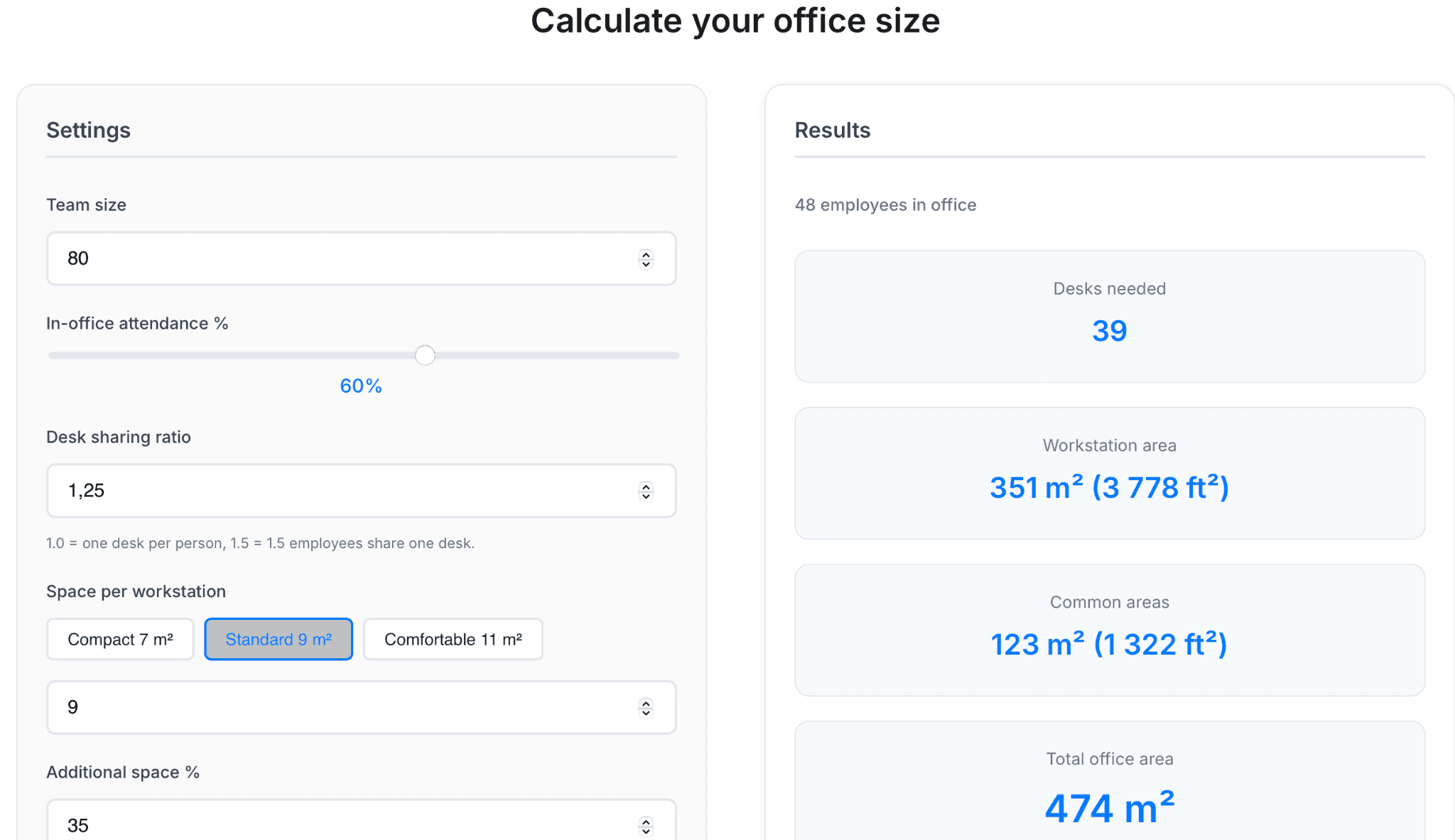
Fig. 1: Office space calculators help estimate how much office space is needed per employee based on your inputs. (Dibsido)
Desk and room booking software
The most accessible starting point. These tools let employees reserve a desk or meeting room before they arrive, from a phone, laptop, or lobby kiosk. In practice, most modern platforms cover both, the two have converged to the point where buying separate tools is rarely necessary.
The main distinction is at the feature level: desk booking is mostly about availability and utilization, while room booking adds capacity limits, equipment options, catering requests, and door display panels. Ghost bookings are a common room-side problem, spaces reserved and never used. Tools with check-in functionality solve this by auto-releasing rooms when nobody shows up.
Both desks and rooms generate the utilization data that tells you whether you have too much space, too little, or just the wrong configuration (read the case study on how desk booking analytics can optimize office space).
Best for: hybrid offices of any size looking to manage flexible seating and shared meeting spaces in a single platform.
Occupancy analytics platforms
These go deeper than booking data by tracking how spaces are actually used, often via sensors, badge readers, or Wi-Fi signals, without requiring anyone to actively book anything.
This is valuable for understanding passive behavior: how many people are in a zone versus how many desks are there? Which floor is underused even when the building seems busy? The data supports bigger decisions around lease renewals, floor reconfigurations, and headcount planning.
Best for: larger offices or multi-location companies where granular, real-time occupancy data directly influences facilities strategy and real estate decisions.
Integrated Workplace Management Systems (IWMS)
IWMS platforms are the enterprise tier, combining desk and room booking, move management, lease tracking, asset management, maintenance, and analytics into a single system. They are powerful but also expensive, complex to deploy, and typically require dedicated IT involvement.
For most office managers at companies under a few hundred people, a full IWMS is significantly more than needed. The implementation alone can take months.
Best for: large enterprises with multi-site portfolios, dedicated facilities teams, and the budget and IT resources to match.
Lightweight all-in-one tools
This is the fastest-growing category. These SaaS products combine desk booking, room scheduling, visitor management, and utilization analytics in a single platform designed to be set up in hours, not months.
They are priced per user or per desk, making costs predictable, built for non-technical admins to manage, and typically come with free trials or free tiers so you can test before committing. For most hybrid offices, this is the sweet spot.
Best for: companies from 20 to 500 employees that want a practical, consolidated solution without enterprise complexity or price tags.
Key Features to Look For
Whether this is your first space management tool or you are replacing something that is not working, these are the features that actually make a day-to-day difference.
Interactive floor plans
A visual map of your office where employees can see available desks and rooms at a glance and book directly. This sounds simple, but it dramatically reduces friction because employees know exactly where they are sitting before they leave home.
Look for floor plans that are easy to update yourself. Your layout will change, and you do not want to raise a support ticket every time you add a desk or move a wall.
Real-time availability
Employees should never have to guess if a space is free. Real-time availability, visible in the app, is now a basic expectation, not a premium feature.
Utilization reporting and analytics
This is where space management moves from reactive to strategic. Good reporting shows you not just what is booked, but what is actually used: peak days, underperforming zones, average occupancy by team or floor. This data becomes your evidence when making the case to leadership for a layout change, a lease renegotiation, or a new hybrid policy.
If you want to see how utilization data informs decision making in practice, read this case study.
Calendar and tool integrations
Your space management tool should plug into how your team already works. Native integration with Microsoft 365/Outlook, Microsoft Teams, Google Calendar, or Slack means employees can book without switching apps. Less friction means higher adoption, which means better data.
Mobile availability
Employees decide whether to come into the office from home, sometimes that very morning. A clean, fast mobile app that shows availability and lets them book in seconds is essential for actually getting people to use the system.
Visitor management
If external guests visit regularly, having visitor check-in in the same platform rather than a separate tool removes a lot of admin overhead. Pre-registration, host notifications, and digital sign-in keep things tidy without extra software to manage.
Neighborhood and zone management
For mid-to-large offices, the ability to group desks by team or department, so that Sales always sits in Zone B even though desks are unassigned, preserves team cohesion in a flexible seating environment.
Common Problems Space Management Solutions Actually Fix
Understanding what space management solutions solve in practice makes it easier to build a business case internally.
"We are paying for space we do not use." Utilization data gives you the hard numbers to support right-sizing decisions. Whether that is subleasing a floor, consolidating to fewer desks, or redesigning a zone, you are working with evidence instead of estimates.
"Employees do not know where to sit on hybrid days." Desk booking removes the morning scramble. When people can see what is available before they leave home and reserve in seconds, the workplace experience genuinely improves.
"Our meeting rooms are always booked but often empty." Auto-release policies and check-in features solve ghost bookings directly. This alone tends to be the most immediately visible win after deploying a room booking system.
"We cannot make real estate decisions without data." Lease renewals, headcount changes, and office reconfigurations are much easier to navigate when you have months of utilization data to work from, rather than relying on gut feel or a survey sent to 200 people.
"HR does not know who is in the office on any given day." Desk booking check-in data gives a reliable, real-time picture of office attendance, useful for onboarding, emergency planning, and compliance in regulated industries.
How to Choose the Right Space Management Solution
With dozens of options on the market, the evaluation process can become its own time sink. Here is a practical framework that keeps it manageable.
Start with your biggest pain point
Are you primarily trying to fix desk conflicts? Reduce meeting room chaos? Get utilization data for a lease decision? Pick the problem that costs you the most time or money right now, and look for a tool that solves it well. Do not let a vendor convince you to buy platform capabilities you will not use for two years.
Match complexity to your actual needs
A 40-person company on one floor does not need the same tool as a 2,000-person company across five buildings. Overshooting on complexity means months of setup, higher cost, and lower adoption. The right tool is the one your team actually uses (see our article on what smaller teams really need from a desk booking tool).
Prioritize integrations with your existing stack
If your company runs on Microsoft 365, a tool with native Teams and Outlook integration will see far faster adoption than one that requires a separate login. The same applies to Google Workspace. Integration is not a nice-to-have. It is what determines whether people use the system or revert to winging it.
Look for fast time to value
Some enterprise platforms take months to deploy and require IT involvement at every step. For most offices, that is not realistic. Tools that can be set up in a day, with floor plans loaded and users invited by the end of the week, let you demonstrate value quickly, which matters when you are making the case to leadership.
Test it before you commit
Any space management solution worth considering offers a free trial or a free version. Use it. Real-world usage reveals things that demos never show: how intuitive the booking flow actually is, whether the floor plan editor is manageable, and whether the reports answer the questions you are actually asking.
Check the admin overhead
Who updates the floor plan when you add desks? Who handles user provisioning? How easy is it to pull a utilization report without involving IT? The best tools are built to be managed by office managers, not just deployed by IT.
Space Management in the Hybrid Era
Space management tools did not become popular because of a feature update. They became essential because hybrid work made office space genuinely complex to manage.
When 60% of your team might be in on Wednesday but only 20% on Friday, you cannot plan around fixed assigned desks. You need a system that flexes with actual demand and gives you the visibility to anticipate it.
The most forward-thinking offices are using space management data not just reactively, but proactively. If utilization data shows collaborative zones at 90% occupancy while solo focus desks are half-empty most of the week, that is a signal to rethink the floor layout. If attendance consistently peaks Tuesday through Thursday but drops sharply on Mondays and Fridays, that is useful input for setting anchor days or adjusting cleaning and energy schedules.
Space management solutions make it possible to run a dynamic, data-informed office without guessing or wasting money on space nobody uses.
7 Space Management Solutions Worth Knowing About
The market has no shortage of options, so this list cuts through the noise. These are the tools that consistently come up in real buyer conversations, chosen to represent different use cases, price points, and team sizes.
Please note that the following comparison is based on data available in May 2026.
Vendor | Best for | Pricing | How to get started | G2 rating |
Dibsido | Fast setup, ease of use, best value for hybrid teams | Free up to 10 users. Paid from $1.90/user/mo. Enterprise: custom pricing | Free plan + free trial | 4.9 |
Skedda | Granular booking rules and policy control | From $99 per space/month. Per bookable space | Book a demo | 4.8 |
Robin | Hybrid work coordination, team presence visibility | Quote-based, per user/month. Targets 500+ employees | Book a demo | 4.4 |
Archie | All-in-one: desks, rooms, visitors, analytics | From $159/mo. $2.80/desk/mo, $8/room/mo | Book a demo | 4.9 |
Envoy Workplace | Visitor-heavy offices, professional guest experience | From $60 per bookable resource/year. Resource-based. | Free trial | 4.4 |
OfficeSpace | Enterprise portfolios, move management, space planning | Quote-based, enterprise budgets. Around 2 months to implement | Book a demo | 4.7 |
Tactic | Small teams, tight budget, basic desk booking | From $3/workplace/mo. 3 plan tiers | Book a demo | 4.6 |
Tab 1: Space Management Vendor Comparison at a Glance. (G2 ratings as of May 2026. Pricing is publicly available where listed; quote-based vendors require a sales conversation. Always verify current pricing on vendor websites before purchasing.)
1. Dibsido — Best for fast setup and teams that want simplicity

Dibsido is built around one core idea: booking a desk, room, or parking spot should take one click. Employees can do it from Microsoft Teams, Slack, the web app, or the mobile app without logging into a separate tool. Interactive floor plans let people pick their spot visually. Auto-cancellation frees up desks when no one shows up. Utilization reports give managers real data on how the office is actually being used.
What makes Dibsido stand out is the combination of fast self-onboarding (a few minutes, no IT project), genuinely affordable pricing, and a free tier that covers teams up to 10 users with no time limit. Trusted by Toyota, Samsung, and Societe Generale.
Best for: Small to mid-sized hybrid offices.
Pricing: Free for up to 10 users. Paid plans from $1.90/user/month. Enterprise pricing for 200+ users.
Free trial: Yes, no credit card required.
2. Skedda — Best for granular booking rules and control
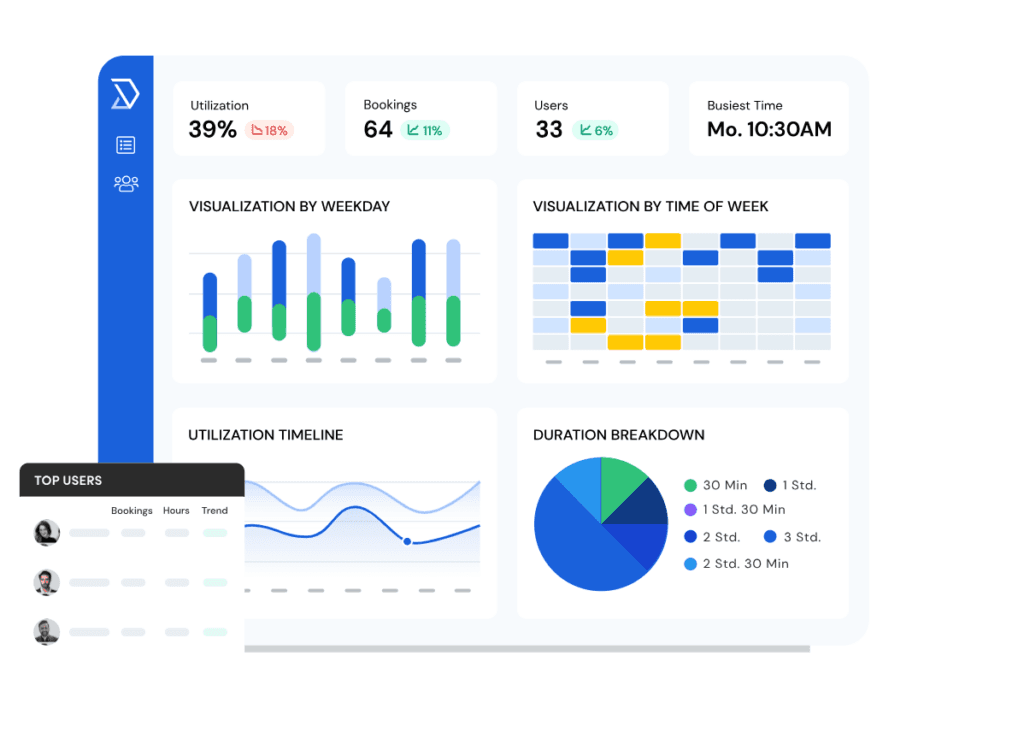
Skedda is amongst the top ranking products on G2 for Space Management in 2026. Its booking rule engine goes deeper than most: quotas, role-based access, time windows, approval workflows, and conditional availability. The trade-off is that per-space pricing, where every desk, room, locker, and parking spot counts, can add up quickly as your inventory grows.
Best for: Small to mid-sized offices.
Pricing: From $99 per space/month. Space-based.
3. Robin — Best for hybrid work coordination

Robin was one of the first tools to tie desk booking explicitly to hybrid work, helping teams see who is coming in, coordinate in-office days, and manage space around people rather than just inventory. Analytics and reporting are solid, and Microsoft 365 and Google Workspace integrations are well developed.
Best for: Mid-sized organizations to enterprises.
Pricing: Quote-based; typically starts at enterprise price points.
4. Archie — Best for mid-sized offices that want an all-in-one platform
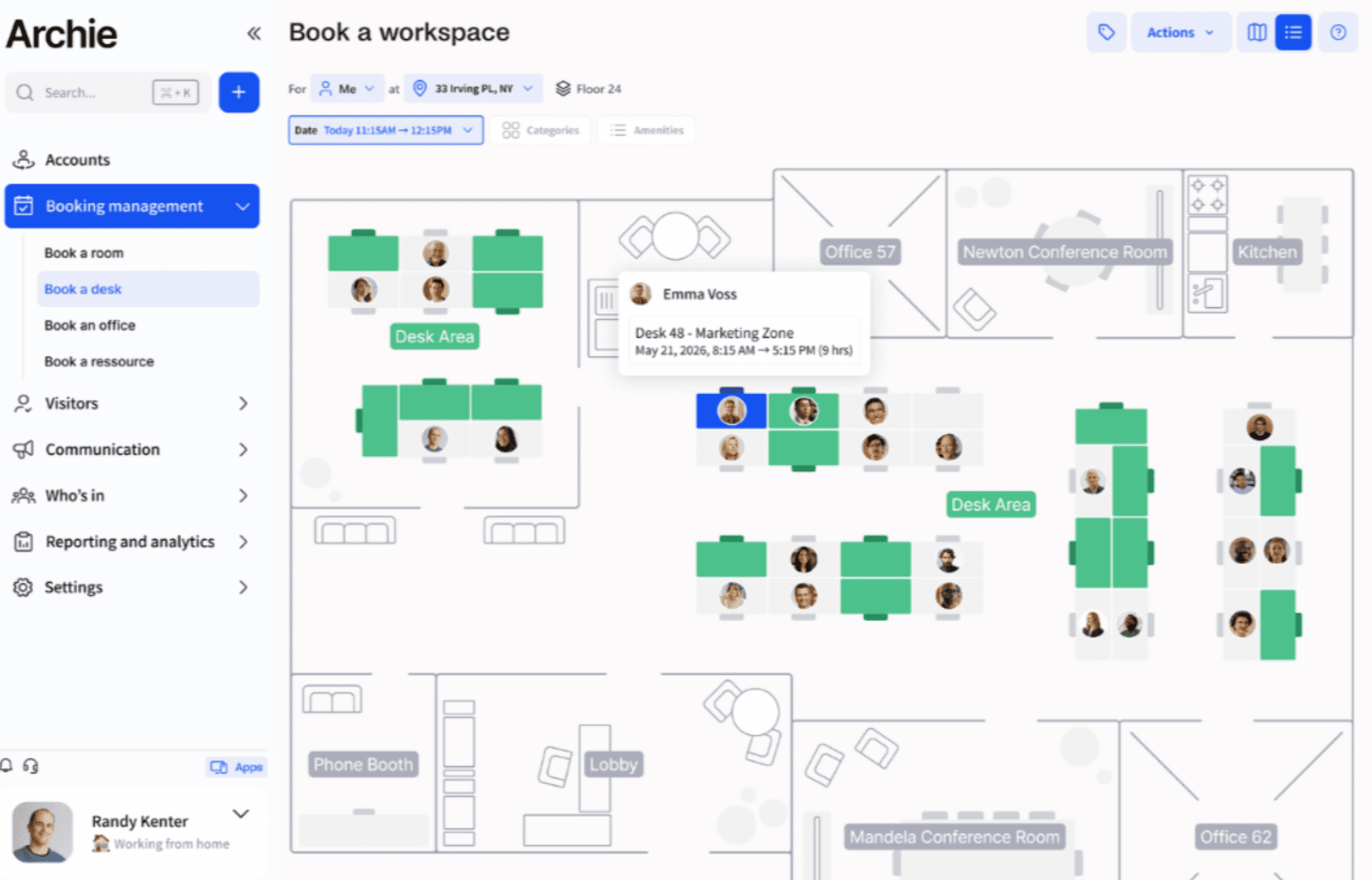
Archie covers the full workplace management stack with a strong admin control layer for zones, booking rules, and team neighborhoods. Pricing is per desk and per room rather than per user, which can feel more predictable as headcount changes.
Best for: Small to mid-sized hybrid offices
Pricing: From $159/month. Desk booking at $2.80/desk/month, room booking at $8/room/month.
5. Envoy Workplace — Best for visitor-heavy offices
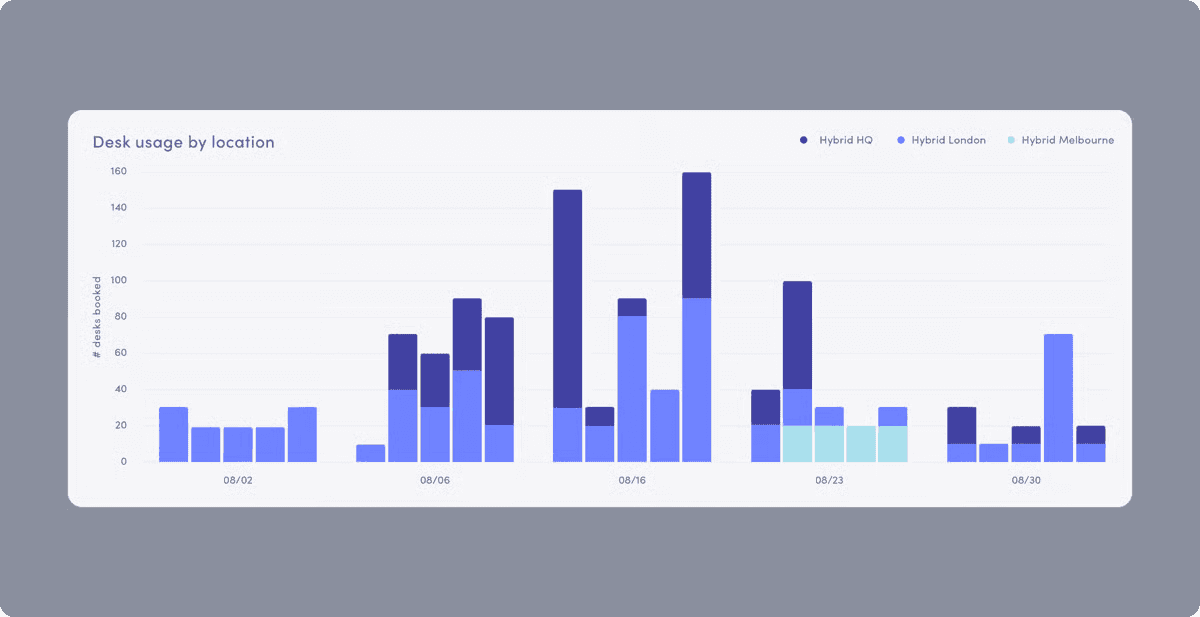
Envoy started as a visitor management tool and expanded into desks, rooms, and workplace analytics. The visitor experience, including pre-registration, digital sign-in, host notifications, and badge printing, remains its strongest suit. Desk and room booking are solid, though less configurable than dedicated booking tools.
Best for: Mid-sized organizations to enterprises.
Pricing: Quote-based. Starts at $60 per bookable resource/year (annual billing).
6. OfficeSpace — Best for enterprise space planning
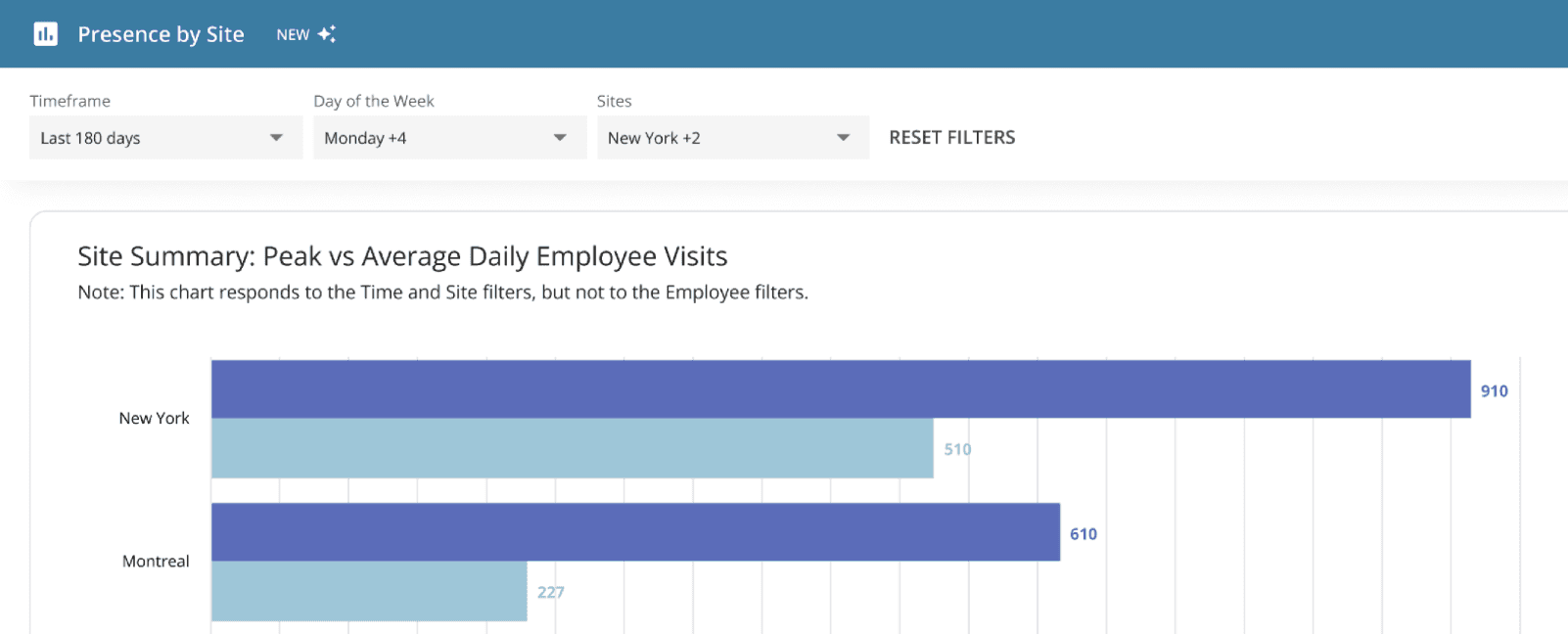
OfficeSpace goes well beyond booking: move management, space planning, asset tracking, and AI-powered scenario modeling for floor plans and occupancy forecasting. It is built for teams managing significant real estate portfolios. The power comes with a price: implementation typically takes around two months, and ROI sits at around 12 months according to G2 reviews.
Best for: Enterprises.
Pricing: Quote-based; enterprise budgets.
7. Tactic — Best for smaller teams on a tight budget

Tactic keeps things simple: desk booking, room reservations, interactive floor maps, and attendance tracking in a clean interface. It is not the deepest platform on the market, but it hits a useful price point for teams that just need the basics sorted.
Best for: Small to mid-sized hybrid offices that want basic desk booking without a large monthly commitment.
Pricing: From $3/desk/month. However, the space management features (analytics) are part of the higher, Pro tier.
Wrapping Up
Space management solutions have moved from a facilities niche to a genuine business priority for any office running a hybrid model. The core value is straightforward: better visibility into how your space is used leads to less waste, less friction for employees, and smarter decisions about the office environment you are responsible for.
The market has matured. There are solid, affordable options at every scale, and you do not need an enterprise budget or a six-month project to get started. The right tool for most offices is one that is easy to deploy, easy for employees to use, and gives you the utilization data you need to do your job well.
If you want a hands-on look at how a desk booking tool handles space management analytics, try Dibsido for free.
Our platform is designed to empower businesses of all sizes to work smarter and achieve their goals with confidence.