Most hybrid offices have more employees who could plausibly drive in than parking spots to give them. The result is a daily contest: people arriving an hour early to claim a space, executives keeping bookings on days they work from home, parents on the school run permanently locked out. Employee parking management software is what replaces the contest with a system. This guide explains what these tools actually do, the features that matter, the features that sound impressive but do not change outcomes, and how to evaluate vendors without getting lost in feature checklists.

Employee parking management software lets your team book office parking spots ahead of time, see real-time availability, and follow the allocation rules your office agreed on (daily booking, pre-booking, credits, or a hybrid).
The four problems it solves: too many drivers for too few spots, no-shows tying up bookings, ad-hoc disputes that escalate to HR, no data on whether parking is actually a constraint.
Must-have features: real-time availability, mobile booking under 30 seconds, easy cancellation, no-show tracking, zone or category support for EV and accessibility spots, utilization reporting.
Skip vendors that bundle parking as an afterthought of a desk booking tool with no booking rules, no zones, and no reporting. Parking has different physics than desks.
Implementation is usually a one-week job: map the lot, import employees, set the allocation method, communicate, go live.
If your office has more drivers than parking spots, you already know the patterns. People arrive an hour before they need to be there, just to be sure. A few power users claim spots daily and everyone else gives up trying. Executives keep bookings on days they work from home. Parents on the school run are permanently locked out. Eventually a parking complaint lands in the HR inbox and someone is asked to "make this fair," which is a polite way of saying the spreadsheet is no longer working.
Employee parking management software is what replaces the daily contest with a system. The tool does not add spots you do not have. It allocates the spots you do have, predictably and visibly, so the daily decision is settled before anyone gets in the car.
This guide walks through what these tools actually do, the features that matter for small to mid-sized hybrid offices, the features that sound impressive in a demo but do not change outcomes, and how to evaluate vendors without drowning in feature checklists.
What employee parking management software actually does
At its core, the tool handles four things:
Shows real-time availability so employees decide whether to drive in before they leave home.
Lets employees book a spot in advance, from a phone or browser, in under a minute.
Enforces the allocation rules your office picked (daily booking, pre-booking, credit-based, or a need-based hybrid).
Tracks what actually happens so admins know whether the lot is full because of real demand or because of no-shows.
That is it. Everything else is a feature on top of those four jobs. If a tool does not do those four things well, the extras do not matter.
The four problems it solves
Problem 1: more drivers than spots
The basic constraint in most offices is not parking, it is matching. You have, say, 30 spots and 80 employees who could plausibly drive in on a given day. On Mondays and Tuesdays everyone wants to be in the office. On Fridays the lot is half empty.
Software solves this by surfacing demand before it happens. An employee opens the app, sees Tuesday is fully booked, and decides to take public transit or work from home that day. The decision moves from 8am at the lot gate to 8pm the night before, which is where it should have been all along.

Problem 2: no-shows tying up bookings
The second most common parking complaint in our customer base is not "I cannot get a spot," it is "I booked a spot and someone else could have used it." Booked spots that go unused are worse than unbooked spots, because they hide the real availability from everyone else.
Software fixes this by making cancellation as easy as booking and by tracking who actually showed up. Some platforms also surface bookings that look like patterns (same person, same day, repeatedly not showing) so admins can apply the office's policy consistently rather than ignoring some no-shows and confronting others.
Problem 3: ad-hoc disputes that escalate to HR
If your parking policy is "first come, first served, and please be reasonable," every conflict becomes a one-on-one HR conversation. Managers do not want to mediate parking. Employees do not want their parking outcome to depend on whether their manager is in a good mood that morning.
A booking system removes the daily judgment call. Once the office decides on an allocation method and the rules are coded into the tool, the dispute moves from "Sarah is hogging the lot" to "the allocation rule allowed three bookings this week and Sarah used hers." That is a much easier conversation, and usually no conversation at all. (For the rule-writing side, our 5-step framework for a fair parking allocation policy covers the policy half of the same problem.)
Problem 4: no data on whether parking is actually a constraint
Without a tool, parking is purely anecdotal. Some people say the lot is always full. Others say it is fine. Facilities does not know whether to add spots, switch to overflow lots, or just communicate the rules better.
A booking system gives you the numbers: how often the lot is fully booked, what percentage of bookings are no-shows, which days of the week run hot, which categories of employee book most. That data turns "we need more parking" into a budget conversation backed by real utilization, not vibes.
Features that matter for small to mid-sized offices
If your office has between 10 and 200 parking spots and a hybrid workforce, this is the realistic checklist:
Real-time availability visible before booking. If employees cannot see whether a spot is free without committing to book it, they will not bother.
Mobile-first booking that takes under 30 seconds. Anything slower trains people to skip the system and just show up.
Easy cancellation with the same one-tap pattern as booking. This is what keeps no-shows under control.
Booking window controls so admins set how far ahead employees can book and when the window opens.
Zone or category support for EV charging spots, accessibility spots, visitor spots, and reserved spots if you have them. Treating all spots the same is where bad parking policies start.
No-show tracking that shows admins who booked but did not arrive. The software does not need to auto-suspend; it needs to surface the data so the team applies the policy.
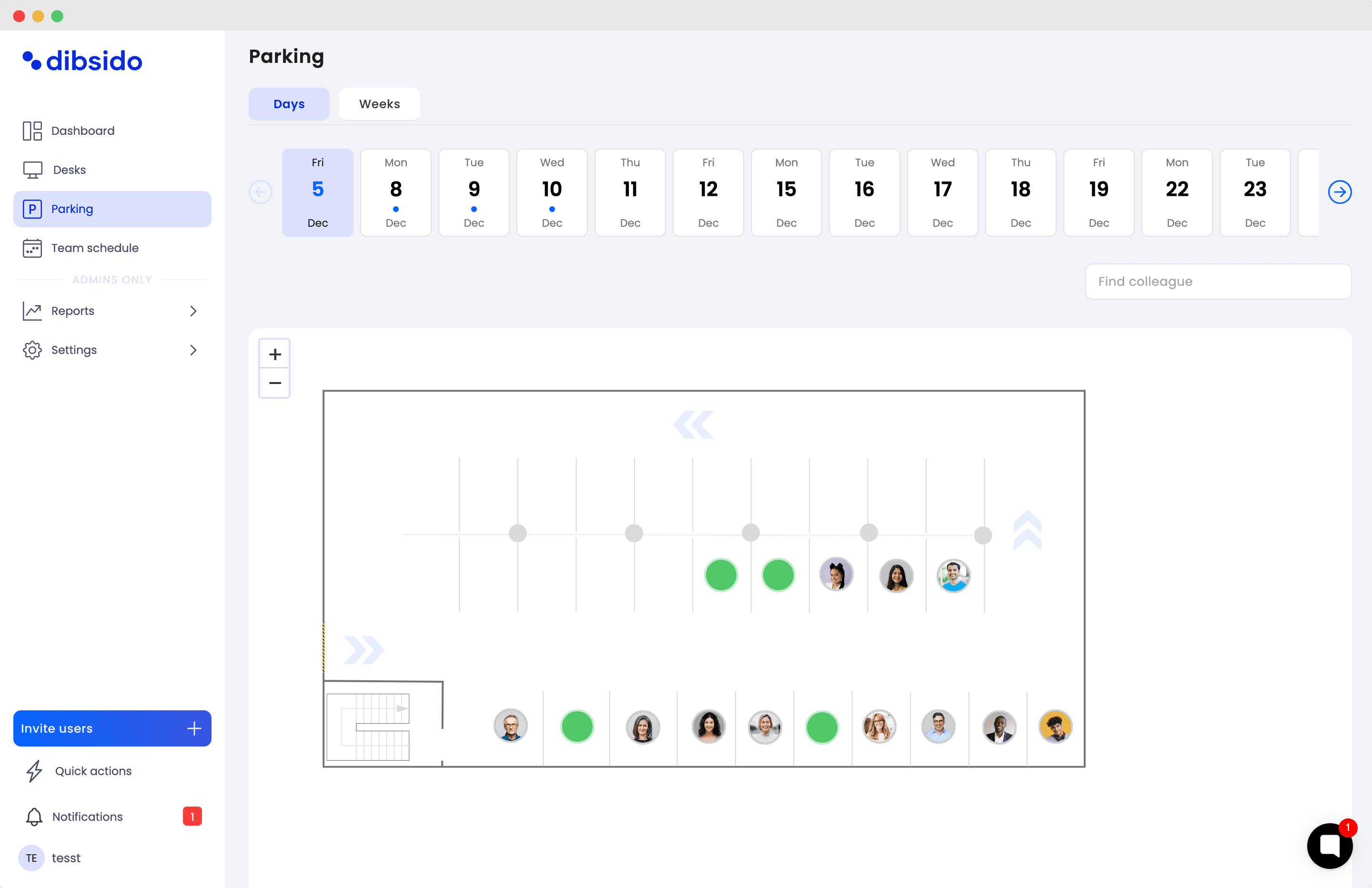
Office map view so employees pick a specific spot, not just a number from a list. This matters less for tiny lots and more for offices with structured parking.
Utilization reporting that shows booking rates, no-show rates, and demand patterns over time. This is what makes the quarterly policy review possible.
Integration with desk booking if your office also books desks. People who come in to park usually also need a desk; making them use two separate tools is friction.
SSO and access control for offices with more than 50 employees. Employee directory sync saves the IT team from manually adding new joiners.
Features that sound impressive but do not change outcomes
Vendors will show you a long list of capabilities. Most of them are demo theater. The ones that genuinely do not change outcomes for small to mid-sized offices:
License plate recognition cameras. Expensive, hardware-dependent, and solves a problem most offices do not have. If your lot is unmanned and people are stealing spots, this matters. Otherwise the cost outweighs the benefit.
Dynamic pricing. Useful for paid public garages, not for employee parking. If you start charging your own employees for spots, the policy problem you are trying to solve will get bigger, not smaller.
AI demand prediction. A normal utilization report from the last 90 days tells you the same thing without the marketing layer. If the tool does not show last quarter's data clearly, it is not going to predict next quarter's any better.
Integration with twenty different systems. Useful if you actually use all twenty. For most offices, integration with Microsoft 365 or Google Workspace for SSO plus a Slack or Teams notification is enough.
Advanced visitor management workflows. A small section of the policy and a way for reception to book a visitor spot is enough. Spinning up a full visitor management system inside the parking tool adds complexity faster than it removes work.
The honest checklist: solve the four core problems, support the allocation method you actually picked, and stay out of the way.
How to evaluate vendors without getting lost
Three filters move faster than feature spreadsheets.
Filter 1: does the demo actually walk through your allocation method? Tell the vendor in the demo intro: "We are leaning toward credit-based allocation," or "We need pre-booking with a 24-hour cancellation window." A good demo will configure that flow in real time. A weak demo will pivot to features you did not ask about. The pivot is the signal.
Filter 2: can a non-technical admin set it up? Ask the salesperson to walk you through the admin setup screens. If "implementation services" or a partner agency is required, the tool is too heavy for a small to mid-sized office. The right tool is the one your facilities or workplace lead can configure in an afternoon.
Filter 3: what does the no-show data actually look like? Ask to see a report on no-shows. If the tool cannot show that, it is treating parking as a bookings problem instead of a usage problem. Usage is what matters.
If you want a wider category overview before picking your shortlist, our parking management software guide covers the broader vendor landscape at the category level.
What setup actually looks like in week one
For a 50-employee office with 20 parking spots and no current system, a realistic week one:
Day 1: Map the lot in the tool. Number or label spots. Flag EV, accessibility, visitor, and reserved spots if you have them.
Day 2: Import the employee list, ideally via SSO directory sync. Decide which user groups have parking access.
Day 3: Configure the allocation method (daily booking, pre-booking, credits, hybrid) and the rules (booking window, cancellation deadline, no-show policy).
Day 4: Write a one-page policy summary for employees. Send it as a single email plus a Slack or Teams post. Pin it where new joiners will find it. The fair parking allocation policy framework walks through the structure.
Day 5: Go live. Spend an hour with the admin dashboard to make sure the first day of bookings looks right.
The software setup itself is usually under an hour. The week is mostly the policy and communication work, which the software does not do for you and which is the part that actually determines whether the rollout succeeds. For a deeper walkthrough of the rollout, see our guide on how to implement a shared parking booking system.
Pricing and total cost
Expect roughly $3 to $7 per parking spot per month, billed annually, for tools priced per spot. Tools priced per user are usually $2 to $5 per employee per month and bundle parking inside a broader workplace booking platform; those are usually cheaper for offices that also need desk and meeting room booking.
Total cost includes a one-time setup investment of a few admin hours, plus ongoing time for policy review (quarterly is typical) and edge case handling. Most offices recoup the cost in saved HR mediation time within the first quarter.
What is not in the price tag: the cost of the next parking dispute that escalates to HR, or the cost of an executive deciding the lot is "broken" because the spreadsheet finally collapsed.
Frequently asked questions
What is employee parking management software?
Employee parking management software is a tool that lets employees book office parking spots ahead of time, shows real-time availability, and enforces the rules your office agreed on for allocating spots. It typically runs in a web browser and on mobile, handles different spot categories (regular, EV, accessibility, visitor), and gives admins reports on how parking is actually being used.
How much does employee parking management software cost?
For small to mid-sized offices, expect to pay between $3 and $7 per parking spot per month, billed annually. Pricing is usually based on the number of spots managed, not the number of employees. Tools that bundle parking inside a broader workplace booking platform sometimes price per user instead, which can be cheaper if you also need desk and meeting room booking.
Do we need a dedicated tool or can we use a spreadsheet?
A spreadsheet works for offices with fewer than 10 parking spots and very low daily demand. Once you have more than one booking conflict per week, the spreadsheet becomes the conflict source rather than the solution. A dedicated tool starts paying back when conflicts hit the HR or facilities inbox more than once a month.
How does parking management software handle EV charging spots?
Most tools let admins flag specific spots as EV-equipped so they appear separately on the office map and in booking flows. The hourly time limit for charging (commonly 2 to 4 hours, after which the car moves to a regular spot) is enforced by team norms and policy communication, not automatically by the booking tool. The tool surfaces who has an EV spot; the team applies the policy.
What happens when an employee books a spot and does not show up?
A good system tracks no-shows so admins can see who booked but did not arrive. The actual consequence (warning, temporary loss of booking rights) is something your team decides and applies, not something the software does automatically. The point of no-show tracking is to free up booked spots for people who would have used them and to make accountability conversations data-backed rather than anecdotal.
Can employees book parking and a desk in the same flow?
Yes, in tools that combine parking with desk booking. The same login takes the employee from picking an office day to selecting a desk to reserving a parking spot in one short flow. This is meaningfully better than two separate tools, especially for offices where parking and desk demand peak on the same days.
How long does it take to set up?
For a small to mid-sized office, expect about a week of elapsed time and a few hours of actual work. The tasks are mapping the lot, importing employees, setting the allocation method, configuring zones if you use them, and writing a short policy communication for employees. The software setup itself is usually under an hour.
From shortlist to system
The right employee parking management software for a small to mid-sized hybrid office solves four problems, runs in under a minute on a phone, and stays out of the way once it is set up. Everything else is optional.
Dibsido handles the four core jobs (real-time availability, fast mobile booking, allocation rules, no-show tracking), pins EV stations on the office map, supports zone-based access for teams or days, and bundles parking with desk and meeting room booking so employees do not need two logins. Pricing starts at €4.20 per parking spot per month, with up to 5 spots on the free plan if you want to try the workflow on a small lot before committing.
Try Dibsido free, no credit card required. Or book a demo if you want to see how the parking workflow handles your specific allocation method before rolling it out to the team.
Our platform is designed to empower businesses of all sizes to work smarter and achieve their goals with confidence.