Only 14% of workers prefer a traditional office, so companies are using workplace experience software to make hybrid work seamless. In this guide, we describe the key areas of workplace experience software and their use cases. We cover desk and meeting room booking, resource scheduling, visitor management, and workplace navigation, and we provide examples of solution providers in each category.
These tools boost productivity, happiness, and space efficiency, turning the workplace into a real value driver.
This shift in thinking comes with good reason. It turns out that when people feel good at work, the business wins as well.
Consider:
According to McKinsey and Company research, companies excelling in workplace experience are 4.2 times more likely to outperform their peers in profitability, innovation, and talent retention.
Only 14% of the global workforce still prefers a traditional office environment (source). The rest prefer something more flexible or engaging, which means companies have to seriously up their game to make the office worth coming to.
Workplace experience software platforms are at the core of this transformation
Think of all the apps and smart systems now helping to coordinate the workday, from desk booking software to interactive office maps to Slack channels building community.
These workplace experience software technologies were once seen as nifty perks, but not essential. That’s no longer the case. Perceptions of workplace tech have shifted from “nice-to-have” amenities to true value drivers for businesses.
What Workplace Experience Really Means
So what exactly is “workplace experience”? In plain language, it’s everything that shapes how an employee feels about a day at work. In other words, every interaction an employee has with their work environment, from the moment they log in or walk in, to the moment they finish up for the day, feeds into the workplace experience.
Workplace experience is a holistic concept that brings together three main pillars:
Physical environment: Office layout, furniture, lighting, noise levels, temperature, and all the amenities that support different work styles. Do employees have collaborative spaces and quiet zones? Are there comfy chairs and natural light? Even things like a well-stocked coffee bar or a cozy lounge area fall in this category.
Digital tools: The software and platforms employees use every day. Fast Wi-Fi, reliable video conferencing, user-friendly apps for things like desk booking, and even a smooth HR portal or intranet all contribute to the experience.
People and culture: Perhaps the most subtle pillar, this is about the human side of work, the relationships, company values, and day-to-day culture that permeate the workplace. It includes how supportive management is, whether colleagues are friendly, and if the company promotes a healthy work-life balance.
All these elements together define workplace experience.
Difference between workplace and employee experience
It’s important to note that “workplace experience” is a subset of the broader concept of “employee experience".
Employee experience is a bigger umbrella covering an employee’s entire journey at a company, from recruitment and onboarding, through career development, all the way to their exit or retirement. It involves HR processes, performance reviews, training opportunities, company mission, and more.
Workplace experience, by contrast, focuses specifically on the day-to-day environment where work happens. For example, employee experience would include how your interview and hiring process went or how you feel about growth opportunities; workplace experience zeroes in on things like “Do I have the right tools and environment to do my job well today, and do I enjoy being here while I do it?”.
Both are crucial, but they’re not the same.
Workplace Experience Software Categories
Workplace experience software refers to the digital tools and platforms that enhance how employees interact with their workplace on a daily basis.
The goal is to make the office experience as smooth and efficient as possible by empowering staff to easily access the spaces and resources they need to do their best work. This means everything from quickly finding and reserving a desk or meeting room, to navigating the office layout, to welcoming visitors and providing feedback.
In the era of hybrid work, where employees split their time between home and the office, these tools have become essential. Let's look at the key categories of workplace experience software and real-world use cases for each.
Desk Booking Systems
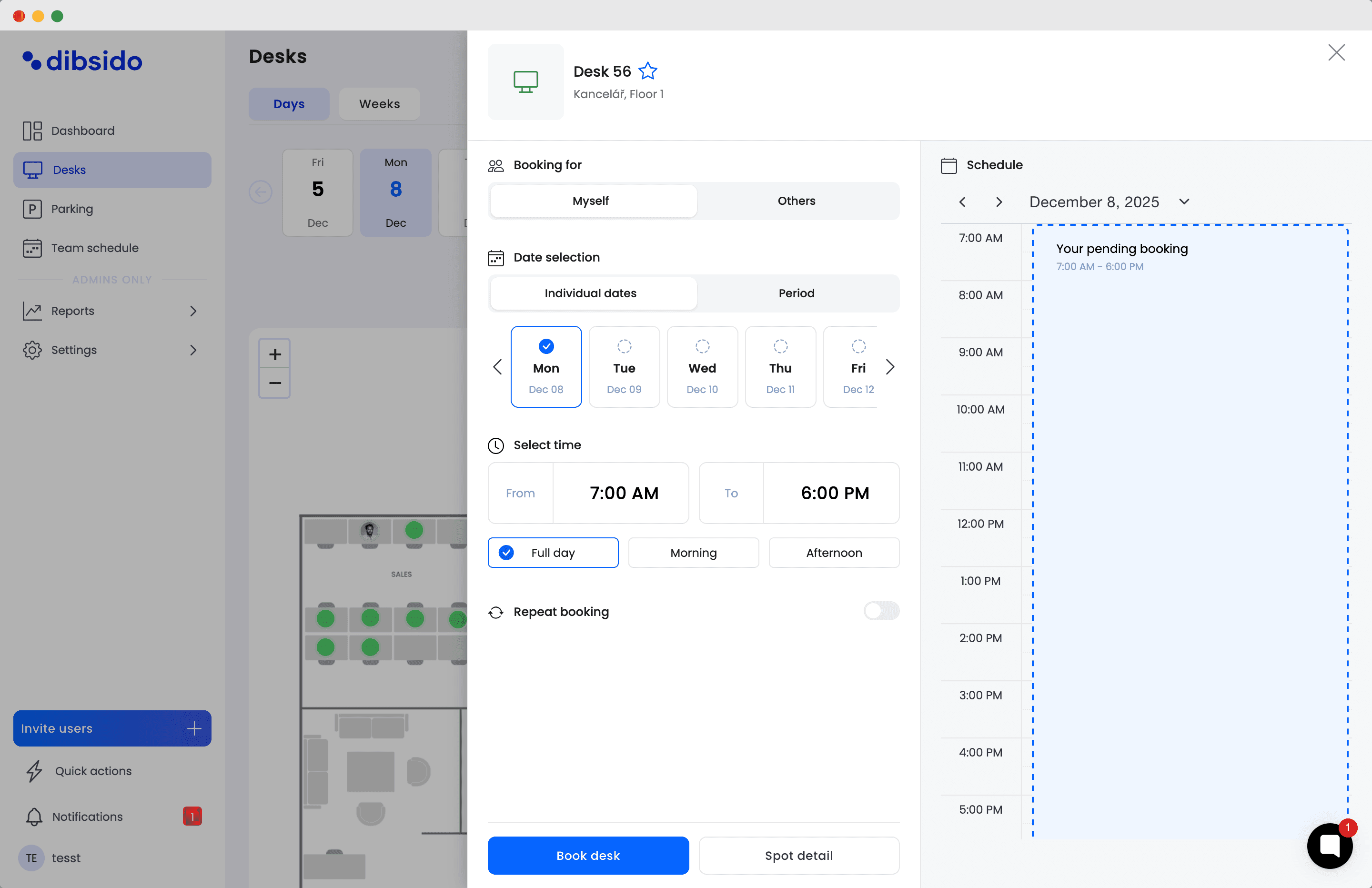
Desk booking software sits in the center of every hybrid workplace. This software, often delivered as SaaS, allows employees to reserve a workspace (desk or office spot) for the days they plan to be in the office.
Instead of a fixed seat for everyone, companies with hot desking or hybrid work arrangements rely on these systems so that people can choose where to sit when they come in. This not only ensures everyone has a place to work, but also gives employees the freedom to pick a desk near their teammates or in a preferred area on a given day.
Common use cases of desk booking systems include:
Flexible seating on hybrid schedules: An employee who works from home most of the week can easily book a desk for the two days she’ll be on-site, guaranteeing a spot and even seeing if colleagues will be nearby.
Optimizing space and reducing crowding: Facility managers can set rules (e.g. capacity limits) in the system. For example, if only 60% of desks are bookable, the app prevents overcrowding and even shows which areas are busiest, helping maintain comfort and safety in a hybrid workplace.
Cost and real estate savings: Over time, data from desk bookings can reveal usage patterns. Companies might discover they can downsize office space if on average only half the desks are occupied, reducing real estate costs while still accommodating peak office days.
If you're interested in this particular aspect of workplace experience, check out our article comparing the best desk booking software.
Meeting Room Booking Systems
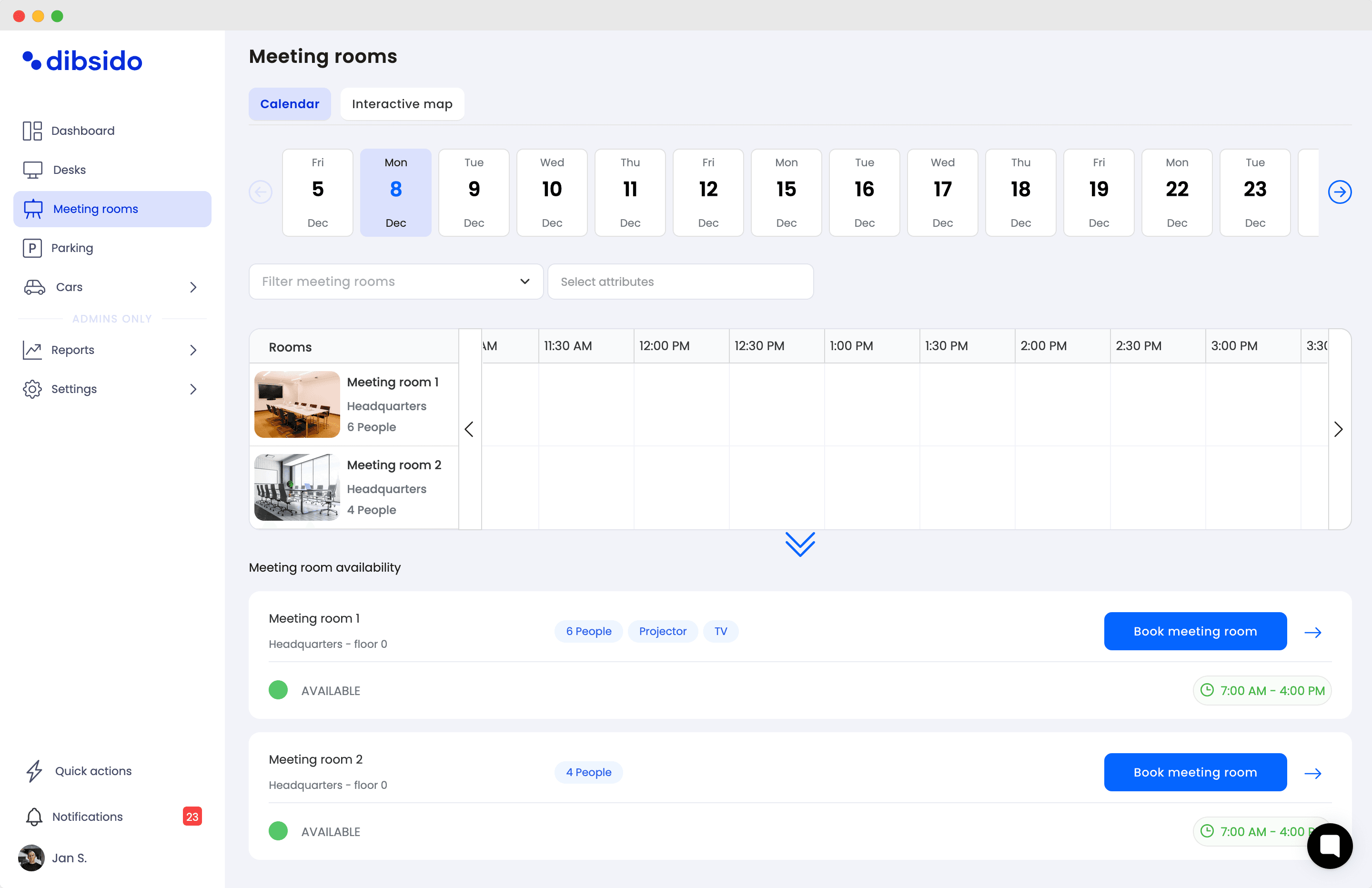
Meeting room booking tool lets employees and teams find and reserve conference rooms or other shared spaces when they need them. Anyone who has scrambled to find an available meeting room on a busy day can appreciate this technology. These systems typically integrate with calendar apps (like Outlook or Google Calendar) so that scheduling a meeting also books a room automatically, avoiding double-bookings or conflicts. They often provide details about each room (size, location, equipment available) to help users choose the right space.
In practice:
Seamless meeting scheduling: The tool syncs with everyone’s calendars, sends invites, and displays the room as taken on a digital floor plan.
Ad-hoc space reservations: If a team needs a huddle room on the fly for a quick brainstorm, they can pull up the app or use a touch-screen panel outside the room to see if it’s free and book it on the spot.
Resource and service booking: Advanced systems let you add services to a room reservation, for instance, ordering catering for a client meeting or requesting an IT setup. This ensures everything needed for the meeting (projectors, coffee, etc.) is arranged with one booking request.
Office Resource Booking (Equipment and Parking)
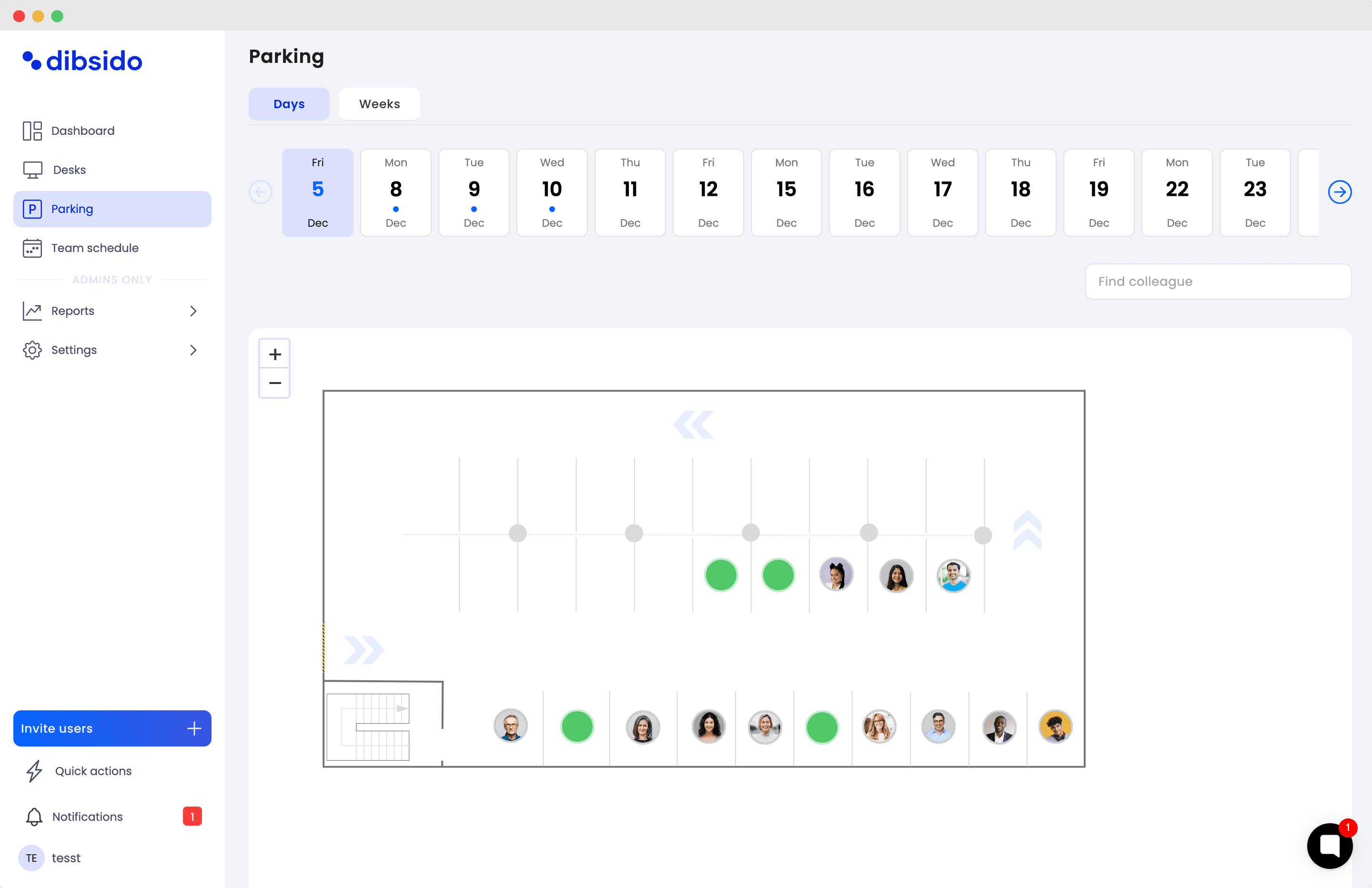
Beyond desks and meeting rooms, workplaces often have other shared resources that can be booked via similar systems. This includes things like parking spots, company vehicles, specialized equipment, or even amenities like a quiet pod or fitness room. A unified resource booking solution allows employees to reserve whatever they need through one interface, preventing conflicts and ensuring fair access.
Real-world examples:
Parking space reservations: In a city office with limited parking, employees can use a parking management app each week to reserve a parking slot on days they commute in. This guarantees a spot and also provides the facility team with a log of lot usage, helping them manage demand or consider incentives for off-peak days.
Equipment booking: In a creative firm, someone might need a high-end camera or VR headset for a project. Instead of emailing back and forth, they simply book the equipment for the afternoon using the resource booking system, which shows where to pick it up and when it’s due back.
Other amenities: Some companies allow booking of things like on-site daycare slots, rehearsal rooms for company bands, or even massage chairs on wellness days. Having these in the same system increases visibility and encourages employees to actually utilize these perks.
Visitor Management Systems
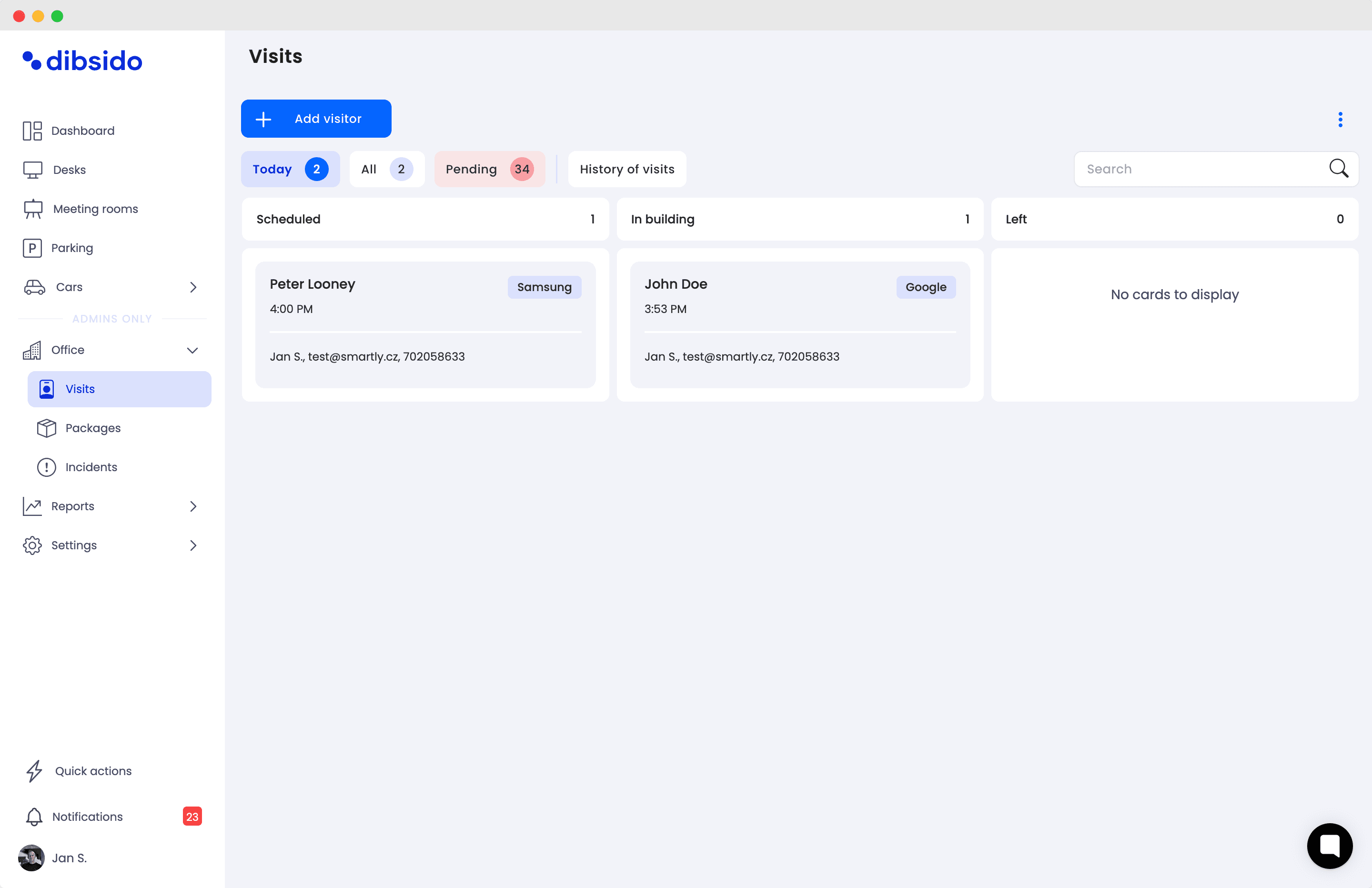
Visitor management software is usually a part of the front desk tools and its goal is to streamline how guests are welcomed and handled at the workplace. Modern visitor systems allow pre-registration of guests, digital check-ins upon arrival (often on a lobby kiosk or tablet), and automatic notification to the host employee. This improves security (knowing exactly who is on-site and when) and creates a smoother, more professional experience for visitors.
Here’s how it plays out in practice:
Frictionless check-in: When a client is invited for a meeting, the host can pre-register them online. The visitor receives a QR code or entry pass to scan at a self-service kiosk at reception. No need for the receptionist to make calls or for the visitor to wait around awkwardly.
Badges and compliance: The system prints a visitor badge or sends a digital badge to the visitor’s phone, often including their name, host, and expiration time. It can also present any NDA or safety instructions for the guest to acknowledge during sign-in.
Visitor analytics and multi-location support: For companies with many visitors or multiple offices, these tools provide logs and analytics, e.g. knowing that 100 people visited last month, or quickly searching who visited on a certain date if needed for contact tracing or an emergency.
Office Wayfinding and Navigation
Finding your way around the office can be a challenge, especially in large campuses or if you’re new or visiting. Wayfinding solutions include digital maps, interactive kiosks, and mobile apps that act like an indoor GPS. They help users locate meeting rooms, desks, amenities, or even colleagues, saving time and reducing frustration. These tools contribute greatly to a positive workplace experience by making navigation intuitive.
Use cases include:
Employee navigation: If an employee has never been to the new satellite office, they can open the workplace app’s map on their phone to search for “Conference Room A” or their coworker’s desk.
Assisting visitors: A wayfinding system can extend to guests as well. For example, a visitor who checks in can be given a link to a map on their smartphone that shows the route from the reception to the specific meeting room.
Facility planning and analytics: On the backend, the same system that powers wayfinding often gathers data on traffic flow in the office. Knowing which corridors or locations see the most foot traffic can help workplace designers improve layouts or signage.
Employee Experience Mobile Apps
As a capstone to all the above, many organizations roll these functions into a single mobile app or platform for employees. A workplace experience app typically lets staff do multiple things in one place: book desks or rooms, see who else is in the office that day, access the office floor map, receive company announcements, submit service requests (for facilities or IT help), and even use it as a digital badge to access doors.
How this helps in practice:
One-stop convenience: Instead of juggling separate tools, an employee planning an office day can use the company’s workplace app in the morning to reserve a desk, book a parking spot, and order lunch from the cafeteria.
Staying connected in hybrid mode: The app keeps both in-office and remote team members in sync. For instance, it can show a feed of office news and events, so even those working from home see what’s happening on-site. It may also integrate chat or collaboration tools.
Feedback and well-being: Modern workplace apps sometimes include pulse surveys or feedback modules where employees can report how their day went or if something in the office needs fixing.
Workplace Experience Software Vendors
This table provides a simplified overview of key workplace experience software vendors across booking, visitor management, and navigation categories. It highlights what each vendor focuses on and how they can support a modern, hybrid workplace.
Vendor | Use case |
Yarooms | Office navigation & wayfinding |
Eptura Visitor | Enterprise-grade visitor flows, access control, compliance & multi-site management |
Dibsido | All-in-one desk, meeting-room, parking, and visitor-management platform |
HqO | Corporate workplace experience, tenant experience, engagement analytics |
Envoy | All-in-one workplace experience, |
Table 1: Workplace experience software vendors list
From Office Management to Workplace Experience
In summary, workplace experience software covers a broad range of solutions all aimed at making the hybrid workplace more user-friendly, efficient, and responsive to employee needs.
From reserving a desk with a few clicks to finding your way to a new meeting room without hassle, these tools have become crucial for companies looking to create a positive, productive environment.
By thoughtfully implementing such technologies, and the practices around them, organizations can support flexibility while maintaining a sense of connection and community in the modern workplace.
If you're looking to explore a workplace booking platform that makes reserving desks, meeting rooms, or parking spots fair and stress-free, Dibsido is worth checking out. Take it for a test drive here.
Our platform is designed to empower businesses of all sizes to work smarter and achieve their goals with confidence.