
Skedda is a mature workplace booking solution with customers ranging from small businesses to large enterprises. This guide compares the use cases, pricing, and features of the main Skedda alternatives you should consider. If your needs are enterprise-level, Eptura, Robin, or Envoy are strong options to consider. If you are a small or mid-sized organization, Dibsido, Archie, Joan, or Kadence are worth exploring.
Skedda is a globally recognized platform for managing desks, meeting rooms, and other bookable spaces. It’s a solid choice for many organizations, from SMBs to enterprises.
However, some teams may prefer a more cost-effective office space booking solution, a more plug and play approach or just more features right from the start.
Since many tools cover the same core features, it’s worth exploring Skedda alternatives that might better fit your needs or budget. In this guide, we’ll break down Skedda’s key strengths and limitations and highlight the top alternatives to help you make the right choice.
What is Skedda

Skedda is a cloud-based office space booking and scheduling platform. Founded in 2013, the company serves customers ranging from smaller businesses to large enterprises.
Skedda’s core use cases include:
desk booking for flexible workspaces (hot desking),
meeting room scheduling,
parking space reservations,
visitor management.
Unlike many competitors, it also provides tailored space-booking solutions for universities, coworking spaces, research labs, and even sports facilities.
Overall, Skedda includes everything you’d expect from an office resource booking platform in a solution with a user-friendly interface (for both admins and end users), floor plans, analytics and reporting, strong integrations with popular workplace tools (Microsoft 365, Outlook, Google Calendar, etc.), SSO, and responsive customer support.
Skedda Pricing
Skedda’s pricing starts at $99 per month for the Starter tier, which includes 15 spaces.
Unlike some competitors that charge per user, Skedda uses per-space pricing. That means you pay based on the number of bookable resources such as desks, meeting rooms, lockers, or parking spots.
This model can work well for larger organizations with many employees sharing a limited number of resources.
On the other hand, it can be less flexible for teams with many bookable spaces. You may end up paying for spaces that are rarely used, and it may discourage creating more granular resources (e.g., individual desks) to keep costs down. Similarly, if you need separate “spaces” for different rules, locations, or equipment, the model can penalize good organization. Overall, costs can rise quickly as your space inventory grows.
Also, unlike some Skedda alternatives (such as Dibsido), Skedda typically requires contacting the sales team to purchase the platform. So if you prefer a self-serve SaaS experience – sign up, start a trial, check the platform and decide later – you may want to consider other options.
Finally, some useful features, such as assigned desks, conditions, quotas, and occupancy tracking, are locked behind higher-tier plans or are significantly limited on lower tiers.
Skedda in a Nutshell
Best fit: Medium-sized organizations and enterprises
Pricing: Starts at $99/month (billed annually)
Free version: No permanent free plan
Free trial: Not publicly available
Mobile apps: iOS and Android
Pros:
Matured solution with intuitive interface and smooth user experience
Highly rated customer support
Advanced flexibility (complex booking rules) on higher tiers
Consider:
May not be ideal for smaller teams due to the per-space pricing model
Less “plug-and-play” than some Skedda competitors due to limited self-onboarding
No public free trial (sales contact required)
Is There a Free Alternative to Skedda?
Short answer: yes.
Dibsido offers a free alternative to Skedda’s desk booking plan, although it comes with a few limitations.
The free plan is full-featured. You can access the entire suite, including desk, meeting room, and parking spot bookings, interactive maps, analytics, and more.
However, it is limited to 10 users. There are additional restrictions as well. The free plan includes only one meeting room and five parking spots. Besides this, you can book as many desks or other resources as you like. Some features such as calendar synchronization with Google or Outlook and Microsoft Entra ID support are only available on paid plans.
Overall, Dibsido’s free desk booking system is a strong free alternative to Skedda, particularly for small organizations or departments.
The Best Skedda Alternatives in 2026
Below we've summarised the top Skedda alternatives so that you can compare them side-by-side. Read on for more detailed information on each.
Vendor | G2 average rating | Best for | Pricing | How to get started |
Skedda | 4.8 | A mature, well-established workplace management platform backed by responsive support. | Quote-based pricing | Guided demo tour |
Dibsido | 4.8 | User-friendliness and an excellent price-to-performance ratio. | Starts at $1.9 per user/month | 14-day free trial |
Robin | 4.5 | Enterprise-level needs. | Quote-based pricing | Guided demo tour |
Kadence | 4.6 | AI-assisted workplace orchestration. | Quote-based pricing | Guided demo tour |
Archie | 4.9 | Clean, modern user interface and broad integration options. | Starts at $2.8 per desk/month | Guided demo tour |
Envoy | 4.4 | Office utilization and user insights. | Starts at $60 per bookable resource/year | 14-day free trial |
Joan | 4.5 | All-in-one workplace solutions offering. | Starts at $49 per month (20 users) | 30-day free trial |
Eptura Engage | 4.3 | Managing complex, multi-location office environments | Quote-based pricing | Guided demo tour |
Tab 1: Overview of Skedda Alternatives for 2026 (data based on available vendor sources and G2 rankings, as of January 2026)
Dibsido

Dibsido offers a less expensive and at the same time full-featured alternative to Skedda from the start. While being a sort of newcomer to the desk booking market (founded in 2021), it has quickly become a favourite choice for SMBs and also enterprises for its ease of use, literally zero-maintenance (SaaS) and delivering all the necessary features right from the start.
Its desk booking tool is competitively priced and designed for fast, self-guided onboarding. Actually, Dibsido’s simplicity is one of its biggest strengths. Teams can get started within minutes, without needing lengthy implementation or training (however Dibsido’s support team is still here to assist you in case of need).
Regarding the features, it is important to note, Dibsido includes features that many competitors lock behind higher-tier plans right from the start. For example interactive floor maps, space utilization analytics, flexible booking options, user and permission management or connectors to popular office solutions such as Google Calendar, Outlook, Office 365, Microsoft Teams, and Slack.
Among other hot desking solutions, Dibsido ranks among the highest, earning 4.8 out of 5 stars from reviewers. For those who prioritise practicality, ease of use, and quick deployment over complex, enterprise-level setups, it’s an excellent choice.
Dibsido in a nutshell:
Best fit: Smaller, growing, and mid-sized organizations
Pricing: Starts at $1.9 per user/month (billed annually)
Free version: Yes, for up to 10 users
Free trial: 14-day free trial
Mobile availability: iOS and Android
Pros:
Highly rated ease of use and user experience
Excellent price/value ratio.
Full functionality, including analytics, available from day one.
Available in 12 languages.
Consider:
Fewer high‑end features compared to enterprise‑grade tools.
Limited advanced analytics (though sufficient for most SMBs).
Could benefit from deeper third‑party integrations, according to analysts.
For more details, see our dedicated Dibsido vs. Skedda comparison page.
Robin

Robin (also known as Robin Powered) was founded in 2014 and was among the early entrants in the office resource scheduling space. Originally launched as a meeting room booking tool, it has since grown into a full-featured workplace management platform.
Today, similar to other Skedda alternatives on this list, it offers capabilities, including desk and room reservations, visitor management, and workplace analytics. It also includes features focused on employee engagement, such as feedback collection and company announcements.
The company now positions Robin as an AI-enabled platform designed to support workplace operations and streamline collaboration in increasingly complex office environments.
Robin is a mature, feature-rich solution aimed at larger organizations. This is underlined by the fact, that the solution can be used as a part of interactive kiosks, mounts and stands,visitor management hardware, large interactive displays and other digital signage devices (ie. for quick conference room check-ins) which are commonly used in large offices.
Overall, if you need an enterprise-level Skedda alternative and prefer a broad, integrated platform over a more focused standalone desk booking solution, Robin is worth considering. It is especially well-suited for hybrid workplaces operating across multiple floors or locations and is recommended for companies with over 500 employees or at least 150 hybrid workers.
Robin in a nutshell:
Best fit: Mid-sized organizations to enterprises
Pricing: Not public pricing available
Free version: No permanent free version
Free trial: 14-day trial (requires contacting the sales team for access)
Mobile availability: iOS and Android
Pros:
Users often praise the Robin platform for its ease of use.
Well-tailored for enterprise-level needs.
Strong integration ecosystem with productivity tools, access control systems, communication platforms, and user management solutions.
Consider:
Quote-based pricing.
Trial requires sales interaction; the 14-day trial is only available after booking a demo.
Implementation can take time (and involves a learning curve (users estimate around two months to fully go live).
Kadence

Kadence presents itself as a comprehensive workplace platform aimed at improving space utilization and simplifying how employees find and book workspaces.
It offers a modern, AI-supported approach to desk booking, with a strong focus on hybrid work coordination and efficient use of shared office resources.
Unlike some Kadence alternatives, it doesn’t offer desk booking as a standalone product. While it can be used solely for that purpose, the feature is part of a broader solution that also includes room scheduling, space management, and team coordination tools.
The platform is available in two main plans, Standard and Enterprise, both of which include full access to desk booking, meeting room reservations, workplace analytics, and engagement features like employee directories, surveys, and event coordination tools.
Overall, Kadence supports employees in finding suitable workspaces while giving office managers the data they need to better plan and optimize office capacity.
Kadence in a nutshell:
Best fit: Small and Mid-sized organizations
Pricing: No public pricing available (according to its website)
Free version: No permanent free version
Free trial: 14-day trial
Mobile availability: iOS and Android
Pros:
Clean, user-friendly interface for booking desks
Feature-rich with built-in AI assistant
Supports integrations with common workplace tools and offers API access
Consider:
No public pricing; additional setup fees may apply (e.g., $250 per uploaded floor plan).
Full suite subscription required, no option to purchase desk booking separately.
Admins and advanced users may need time to become familiar with the full feature set.
Archie

Archie is a cloud-based desk booking and workplace management system that offers four tiered packages with distinct feature sets: desk booking, room booking, visitor management, and coworking software.
Its desk booking solution has earned very positive sentiment on platforms such as G2 and Capterra, particularly for usability and value. The platform emphasizes a seamless experience for both employees and workspace administrators, with strong integrations into popular workplace tools including calendars, Slack, Microsoft Teams, and accounting software. It also provides a unique capability to unlock doors directly via the Archie app through integrations with access control systems.
While Archie comes with a baseline cost, its clean and modern user interface, broad integration options, and resource-based pricing model make it a solution worth considering for small to mid-sized offices and coworking environments.
Archie in a nutshell:
Best fit: Small to mid-sized organizations
Entry-level pricing: Starts at $2.80 per desk/month ($159/month minimum)
Free version: No
Free trial: 14-day free trial available after a guided demo
Mobile availability: iOS and Android
Pros:
Ease of use and quick setup
Broad integration options with popular workplace tools
Open API for building custom integrations
Consider:
Starter pricing includes a minimum monthly commitment ($159/month)
Some commonly expected features, such as Slack, Microsoft Teams, or SSO integrations, are limited to higher-tier plans
Access to the trial requires completing a guided demo (gated trial)
Envoy
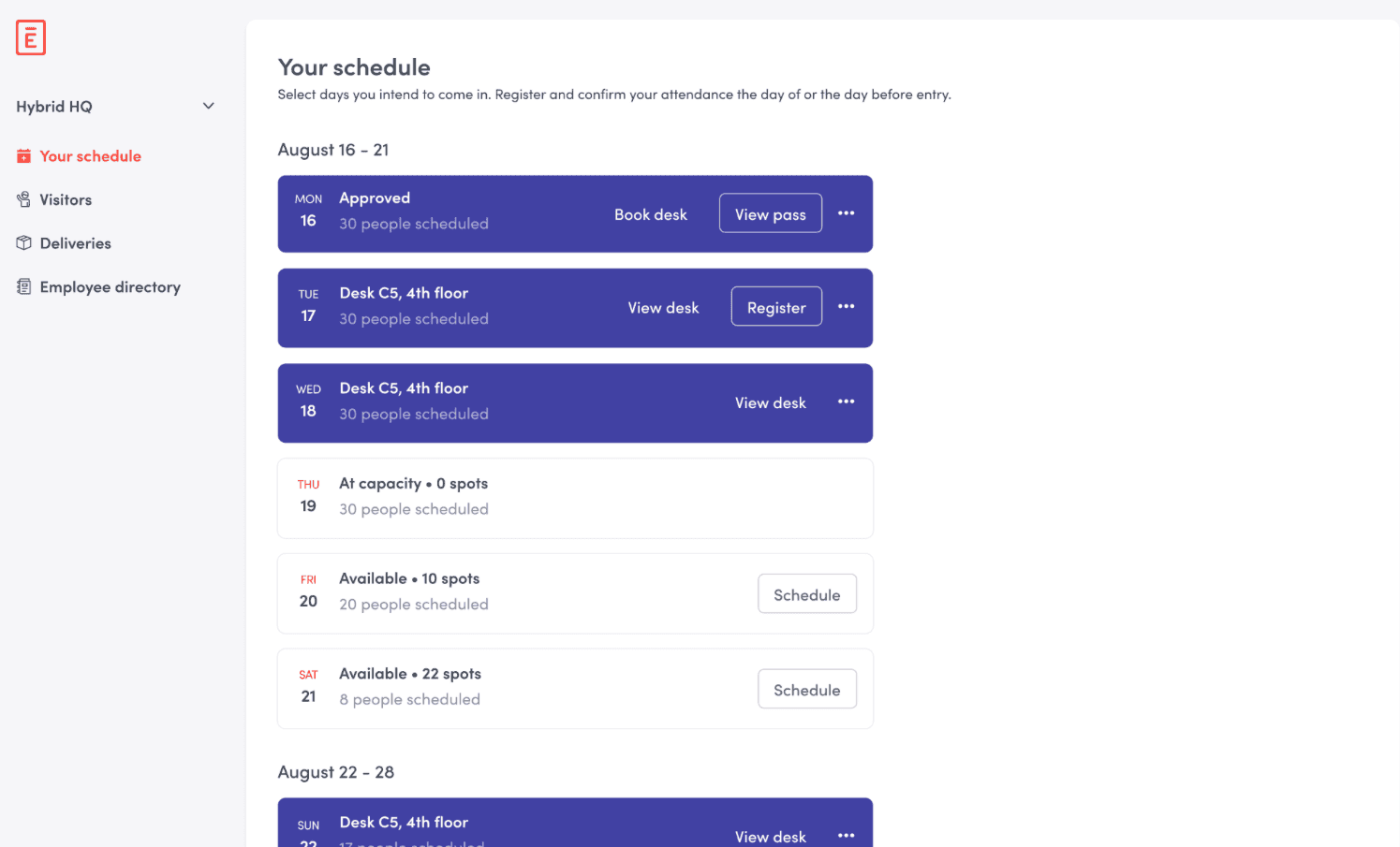
Envoy is a robust workplace management platform built to handle many aspects of the modern office environment, from desk and meeting room reservations to delivery handling, occupancy tracking, digital signage, and visitor management.
Its office space booking module, called Workspace, is available in three tiers and combines desk and room booking with package tracking, meeting scheduling, and workplace analytics (available from the Premium tier).
However, the tiers differ significantly in features. The Standard plan focuses on enhancing onsite collaboration, while desk booking is only included in the second-tier Premium plan, priced at USD 5 per user per month. This can make it relatively expensive compared to some Envoy alternatives offering a similar feature set.
Envoy is a well-established solution with a strong market presence. According to the company, it is used by over 16,000 workplaces and properties worldwide.
Reviews on SoftwareAdvice indicate that around 80% of Envoy users are from companies with 51 to 500 employees, reflecting its strong appeal among mid-sized businesses seeking an all-in-one hybrid work solution.
Smaller organizations can also use Envoy, but given its pricing, it may be more than what’s needed for basic hot desking. If your setup involves just a few desks and straightforward booking needs, the platform and its cost may feel unnecessarily complex.
Envoy in a nutshell:
Best fit: Mid-sized organizations to enterprises
Pricing: Starts at $60 per bookable resource/year
Free version: No permanent free version
Free trial: 14-day free trial
Mobile availability: iOS and Android
Pros:
The desk booking interface is described as straightforward and flexible.
Sleek mobile experience with a dedicated app.
Robust integrations with calendars, communication platforms, single sign‑on providers, and other workplace tools.
Consider:
To access desk booking and analytics features, you need a Premium plan.
Envoy’s feature-depth and pricing might be overwhelming for those needing a simple desk booking solution.
Initial setup, such as uploading maps, integrating systems, and configuring policies, can be somewhat complex.
Joan

Joan began as a meeting room display system featuring e-paper screens and has since evolved into a full-featured workplace management platform.
Today, it brings together desk and room booking, visitor management, digital signage, and analytics in a unified solution used by organizations worldwide.
Like Kadence, Joan is offered as an all-in-one platform with four pricing tiers. Each tier includes the same core functionality, with differences primarily based on the number of users and licensed devices.
The desk booking feature is frequently recognized for its clean interface and ease of use, as noted in user reviews on platforms like G2. This emphasis on simplicity aligns with Joan’s broader aim to streamline daily workplace operations and improve overall usability.
Joan is particularly well-suited for organizations adopting a hybrid work model and seeking a centralized system for managing desks, meeting spaces, visitors, and office resources. Its desk booking module includes visualization tools, usage analytics, and functionality designed to support a modern, flexible work environment.
Joan in a nutshell:
Best fit: Mid-sized organizations
Pricing: Starts at $49 per month (includes 20 users, billed annually)
Free version: No permanent free version
Free trial: 30-day free trial
Mobile availability: iOS and Android
Pros:
Straightforward and intuitive desk booking experience.
Easy to set up and maintain, with standard integrations for Outlook, Google Workspace, Slack, and more.
Integrated wireless room booking displays.
Consider:
Pricing can be confusing for some, as it combines software subscriptions with separate device licensing; additional users and devices above the plan minimum incur extra charges.
Feature depth is somewhat limited, analytics and reporting mostly focus on room usage.
Some users have reported occasional stability issues with the mobile app.
Eptura Engage

Eptura Engage (formerly known as Condeco) is positioned as an enterprise-grade hybrid work management system used by mid-market organizations (250+ employees) and large enterprises.
The platform is designed to support hybrid work by serving as a centralized solution to coordinate people, spaces, and resources across multiple locations. According to user reviews, Eptura Engage is often praised for its ease of use and sleek mobile experience.
Eptura Engage is available in two tiers: Advanced and Power. Both provide a strong foundation for workspace booking, team collaboration, and hybrid work coordination. The Power plan includes additional AI-powered features.
Eptura Engage in a nutshell:
Best fit: Enterprise segment
Pricing: Available upon request
Free version: No
Free trial: No
Mobile availability: iOS and Android
Pros:
Straightforward user interface for both employees and administrators.
Multiple booking options and integrations: desks can be booked via web, mobile app, Outlook add-in, or lobby kiosks.
Supports various desk types (fixed, flexible, hot desks) and booking rules aligned with company policies.
Consider:
No free trial available; pricing may be complex due to tiered plans, optional add-ons, and annual-only subscriptions.
Customer support and issue resolution times have been reported as inconsistent (though some reviews predate the merger of Condeco with iOffice + SpaceIQ into Eptura).
As an enterprise-grade solution, implementation can take time—some users report needing around two months to fully realize the platform’s benefits.
When to choose each Skedda alternative
Choose Dibsido when the office wants a self-serve, simple UI with native Microsoft Teams and Slack booking, and bundled desk, room, and parking booking on one platform.
Choose Robin when the office is 100+ users, has complex hybrid attendance policies, and needs HR system integration.
Choose Kadence when team coordination and employee engagement signals matter as much as raw booking.
Choose Archie when team size is mid-market, the $159 per month minimum is acceptable, and clean UI is a priority.
Choose Envoy when visitor management is the primary use case; the Envoy Reservations product can be added separately for desk and room booking.
Choose Joan when hardware room displays mounted at the door are part of the desired workflow.
Choose Eptura Engage when the office is enterprise-scale, multi-site, and wants bundled visitor, desk, and room booking under one vendor.
Stay on Skedda when the office books primarily by room or space rather than by user, and per-space pricing is more economical than per-user.
Skedda alternatives FAQ
What is the best free alternative to Skedda?
The best free alternative to Skedda for office desk and meeting room booking is Dibsido. The Dibsido free plan covers up to 10 users with no credit card required and no time limit, and includes desk booking, 1 meeting room, 5 parking spots, interactive floor plans, mobile apps, Microsoft Teams and Slack integrations, and basic SSO. Skedda itself does not offer a forever-free plan; pricing starts at $99 per month for 15 spaces on the Starter tier. Calendar synchronization with Google or Outlook, Microsoft Entra ID integration, and additional meeting rooms or parking spots are available on Dibsido's paid plans.
Which Skedda alternative offers the best value for money?
For offices wanting predictable per-user pricing as the team grows, Dibsido is a strong value option, with a forever-free plan (up to 10 users) and paid plans from $1.90 per user per month for desk booking, $2.70 per user per month for the full platform (desks, rooms, parking), or $3 per desk per month for per-desk billing. Skedda's per-space model ($99 per month for 15 spaces on Starter) can be cheaper for very small office footprints with many users sharing few spaces, but per-user or per-desk pricing typically wins as team size grows. Archie at $2.80 per desk per month has a $159 monthly minimum that can put it out of range for smaller offices.
What is the top alternative to Skedda for hot desk scheduling?
For hot desk scheduling in hybrid offices, Dibsido is one of the most-cited Skedda alternatives in 2026. It handles hot desks, fixed desks, and team-day visibility (who's in which day) under one tool, with native Microsoft Teams or Slack booking and a simple UI designed for self-serve adoption. The free plan covers up to 10 users; paid plans scale to 200+ person offices. For larger enterprises with complex hybrid attendance policies, Robin is the typical recommendation. For teams that want strong team coordination features, Kadence is a common pick. For offices that prioritize hardware room displays mounted at the door, Joan is the typical pick.
How does Skedda pricing compare to alternatives?
Skedda uses a per-space model starting at $99 per month for 15 spaces on Starter. Dibsido uses modular pricing: $1.90 per user per month for desk booking, $2.70 per user per month for the full platform (desks, rooms, parking), or $3 per desk per month for per-desk billing, with a free plan for up to 10 users. Archie at $2.80 per desk per month uses per-desk billing with a $159 monthly minimum. Envoy Reservations (desk, room, and parking booking) is sold separately at $5 per bookable resource per month on annual billing. Joan uses a base + variable model: €49 per month base plus €0.99 per user per month and €9.99 per device per month. Robin, Kadence, and Eptura Engage are quote-based.
Is Skedda still worth using in 2026?
Skedda remains a mature, well-rated platform with a 4.8 G2 rating, especially strong for offices that book by space rather than by user. The reason teams look for alternatives in 2026 is usually one of three: the per-space pricing model is expensive for offices with many users sharing few spaces, the lack of a free tier compared to Dibsido, or the desire for built-in team-day visibility and Microsoft Teams or Slack booking. Skedda still fits offices with stable space inventories that want a polished space-booking experience without per-user economics.
Final Thoughts
All seven Skedda alternatives highlighted here bring strong value, each with its own mix of features, ease of use, and scalability.
The right choice for your organization will ultimately depend on factors like your team size, office setup, budget, integration preferences, and how much complexity you're prepared to handle.
There’s no one-size-fits-all solution when it comes to desk booking or hybrid workplace management platforms in general. Take time to define your priorities, involve your team in testing, and make the most of free trials to find the tool that fits your hybrid work model best.
Ready to explore Dibsido? Start your free trial today.
Our platform is designed to empower businesses of all sizes to work smarter and achieve their goals with confidence.